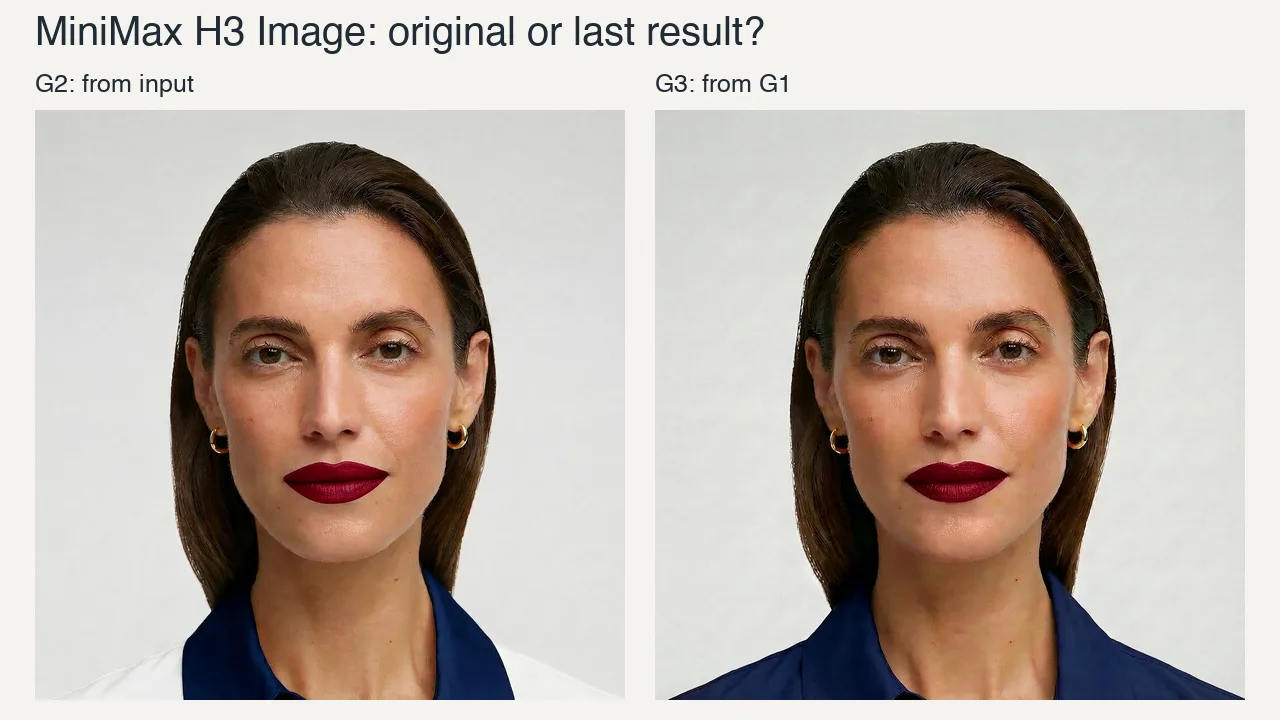
在三次真实 MiniMax H3 Image 编辑中,从原图重新要求“莓红唇色+深蓝衣领”,以及从前一次结果继续要求这两项,都得到了相应颜色。但接着上次结果生成的 G3,把可见肩部也染成了深蓝,超出了“只改衣领、衬衫其余部分不变”的要求。本次从原图出发的 G2,肩部仍是浅色。
这是这组图片的具体差异,不是某条路径普遍胜出的结论。三次请求各取首张结果,均为 2048 × 2048,没有重抽。封面左为 G2、右为 G3,完整画面缩小并排,未裁掉肩部。
1. 先看清三次编辑分别用了哪张输入
一则 Reddit 编辑讨论提出了每次都用原图,还是沿用上一结果继续修改的问题。我们使用改唇色教程中的虚构成人人像,对照这两种输入选择,没有上传真人照片。
| 结果 | 实际作为图片 1 的输入 | 提交的要求 | 本次观察 |
|---|---|---|---|
| G1 | 原始来源经服务规范化后的 WebP | 只把唇色改成莓红 | 闭唇、莓红,衣领仍浅 |
| G2 | 第二次上传得到的、与 G1 输入字节一致的规范化来源 | 莓红唇色+深蓝衣领,衬衫其余部分不变 | 莓红闭唇、深蓝衣领,肩部仍浅 |
| G3 | 通过“继续编辑”(英文 Edit this result)引用 G1 原 PNG 结果资产 | 与 G2 逐字相同的提示词 | 莓红闭唇,深蓝延伸到可见肩部及画面下缘 |
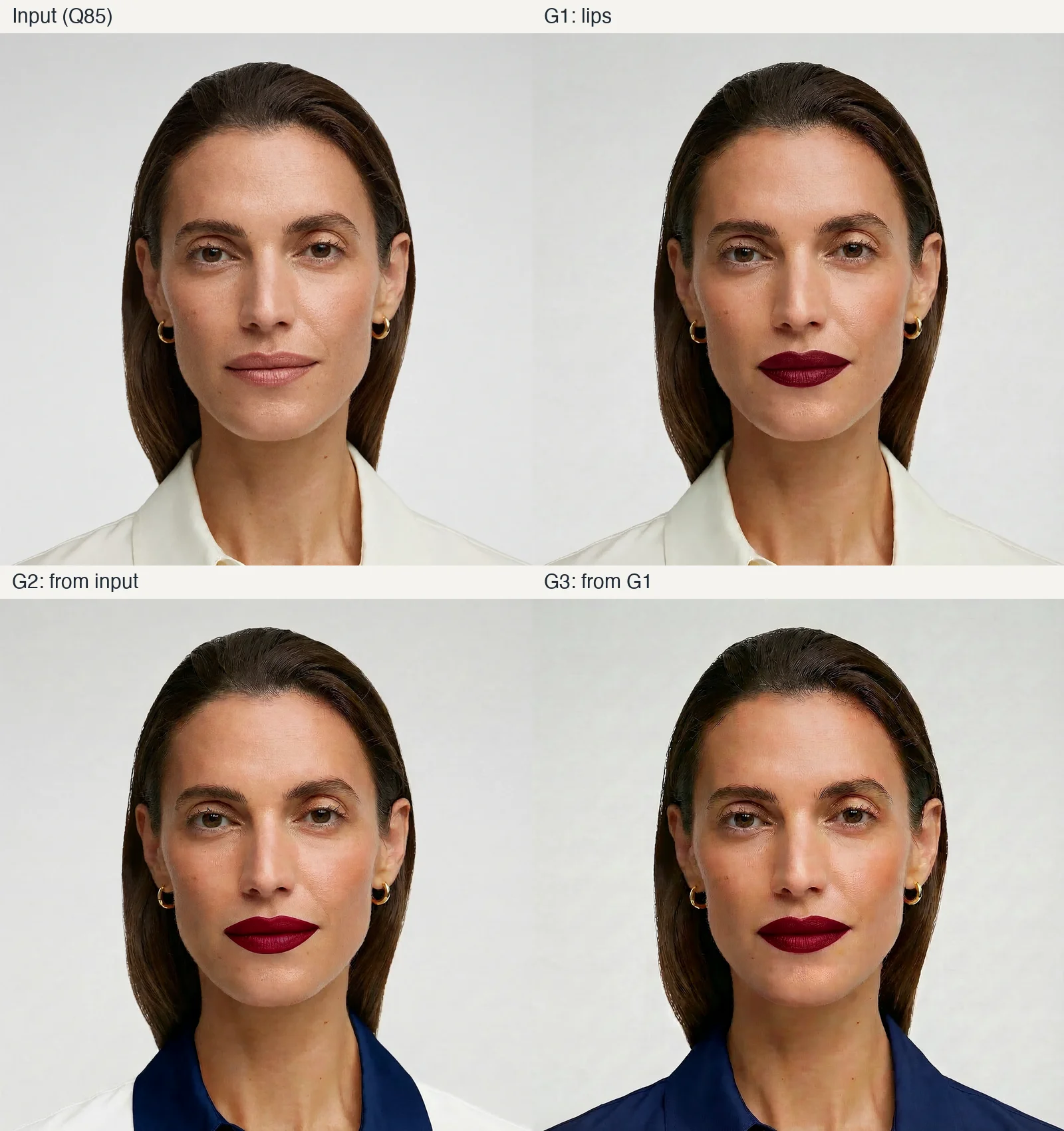
1600 × 1700 阅读拼图,每张人像均保留完整画面。下方唇部和衣领图才是明确标注的局部裁剪。这些有损 WebP 阅读图均未用于数值取样。
实际上传来源 WebP为 647,430 字节、quality 95。G1、G2 分别走了一次正常网页上传,服务将两份参考规范化为 quality-85 WebP:均为 270,574 字节,文件字节完全相同。本次测量基准是实际规范化参考,不是上传前的 Q95 文件,也不是阅读预览。
G3 没有把下载的 PNG 再上传一次,而是由工作台直接引用 G1 的原结果资产。网页上显示的较小预览不是模型输入。
2. 两份完整提交提示词
G1:只改唇色,548 个 Unicode 码点。
Edit <Picture 1>. Change only the lipstick color on the visible closed lips to a rich berry red, a deep red with a subtle purple undertone. Keep the lip outline, mouth position, closed-mouth expression and skin texture unchanged. Preserve the face shape, eyes, eyebrows, nose, all other makeup, cheek skin tone, hair, both gold hoop earrings, ivory shirt collar, gray background, lighting, framing and image dimensions. Do not add makeup outside the lips, change facial features, open the mouth, add teeth, or add objects or text. Return one image.G2 与 G3:逐字相同,596 个 Unicode 码点。
Edit <Picture 1>. Set the lipstick on the visible closed lips to a rich berry red, a deep red with a subtle purple undertone. Set only the shirt collar to deep navy blue. Keep the lip outline, mouth position, closed-mouth expression and skin texture unchanged. Preserve the face shape, eyes, eyebrows, nose, all other makeup, cheek skin tone, hair, both gold hoop earrings, gray background, lighting, framing and image dimensions. Keep the rest of the shirt unchanged. Do not open the mouth, add teeth, alter facial features, add makeup outside the lips, or add objects or text. Return one image.因此,G3 虽然已经以莓红唇色的 G1 为参考,仍重新声明了目标唇色。我们没有测试更短的“只改衣领”后续指令。上面两段是用户输入,不是模型实际收到的扩写文本。
三次任务均已从对应历史记录取得实际扩写。G2 明确写了“while the rest of the shirt remains white.”(衬衫其余部分保持白色);G3 则写“its identity and the rest of the shirt material remain, while the collar color is changed to deep navy blue.”,保留了衬衫其余部分的材质描述,却未再明确其颜色保持白色。这是实际观察到的差异,但不能单独用来解释蓝色肩部:随机种子和输入图片也不同。
记录的模型输入扩写(非网页新控件)
下面是三次运行各自记录的完整工作流扩写,不是另外三份用户输入,也不是工作台新增的控件。扩写中的“preserved”或“identity”是指令措辞,不是身份保持或像素不变的验证结果。G1/G2 规范化参考的 SHA-256 相同:2b06200a3b7d4b60。
G1:实际记录的扩写。
The woman in <Picture 1> is <Subject 1>. The target image shows <Subject 1>. <Subject 1> is partially preserved; the lipstick color on the visible closed lips changes to a rich berry red, while the lip outline, mouth position, closed-mouth expression, face shape, eyes, eyebrows, nose, cheek skin tone, hair, both gold hoop earrings, ivory shirt collar, gray background, lighting, framing and image dimensions remain unchanged. The visible closed lips on <Subject 1> now display a rich berry red lipstick color, a deep red with a subtle purple undertone.G2:实际记录的扩写。
The woman with brown hair and brown eyes in <Picture 1> is <Subject 1>. The white shirt collar in <Picture 1> is <Subject 2>. The lips in <Picture 1> are <Subject 3>. The gold hoop earrings in <Picture 1> are <Subject 4>. The gray background in <Picture 1> is <Subject 5>. The target image depicts the woman with modified lip color and collar color against the gray background. <Subject 1> is partially preserved; facial features, expression, skin texture, hair, and earrings remain identical while the lipstick color on the lips changes. <Subject 2> is partially preserved; the collar material remains unchanged while the color changes to deep navy blue. <Subject 3> is changed to a rich berry red with a deep red hue and subtle purple undertone. <Subject 4> is fully preserved. <Subject 5> is fully preserved. The lips maintain a closed-mouth expression with the original outline and mouth position, now covered in the rich berry red lipstick. The shirt collar area transitions from white to a deep navy blue tone, while the rest of the shirt remains white. The lighting and shadows on the face and neck remain consistent with the original source image.G3:实际记录的扩写。
The woman in <Picture 1> is <Subject 1>. The visible shirt collar in <Picture 1> is <Subject 2>. The closed lips with lipstick in <Picture 1> are <Subject 3>. The target image shows <Subject 1> with <Subject 3> set to a rich berry red, a deep red with a subtle purple undertone, applied precisely to the visible closed lips. <Subject 1> is partially preserved; its identity, face shape, eyes, eyebrows, nose, all other makeup, cheek skin tone, hair, both gold hoop earrings, closed-mouth expression, lip outline, mouth position, and gray background remain, while the lipstick color on <Subject 3> is altered. <Subject 2> is partially preserved; its identity and the rest of the shirt material remain, while the collar color is changed to deep navy blue. <Subject 3> is partially preserved; its lip outline, mouth position, closed-mouth expression, and skin texture remain unchanged, while the pigment is set to the rich berry red tone. The lighting and framing remain consistent with the source image.3. 不能只检查目标颜色

每张 2048 × 2048 图片均取 x=850、y=1210、宽390、高160,顺序固定为来源 → G1 → G2 → G3。
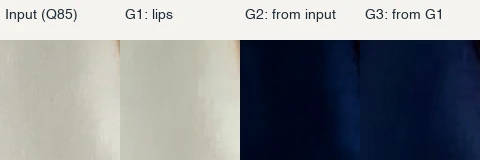
两个冻结区域的 RGB 各通道中位数如下:
| 区域:x、y、宽、高 | 规范化输入 | G1 | G2 | G3 |
|---|---|---|---|---|
| 上唇:925、1242、220、34 | 149, 78, 67 | 84, 4, 16 | 95, 0, 11 | 87, 0, 11 |
| 左领:650、1800、120、120 | 193, 190, 178 | 191, 191, 177 | 0, 8, 30 | 5, 19, 48 |
中位数按每个通道分别统计。左领读数能核对局部改色,但这么小的框不能证明整件衬衫都按要求保留。G3 的肩部扩色来自完整画面的目检;本轮没有额外添加肩部测量框。
非目标像素也变了。固定左面颊框(680、1010、130、140)相对于规范化输入的平均通道绝对差为:G1 5.450、G2 6.117、G3 7.356。算法是在相同像素坐标处,对 RGB 三通道的绝对差取平均,单位为 0–255 通道值;取样前未配准、移动坐标或缩放。这些数字不是同一人身份保持率,也不是质量合格线。
4. 在工作台实际选择两条输入路径
打开图片工作台,手动选择图片编辑/跟随原图/1 张。链接不会自动载入这张人像或提交任务。登录后上传来源,先核对当前总积分报价,再主动提交。
本次先在标签 A、B 分别上传同一来源,核对两份规范化参考的字节完全一致,此时尚未提交任何生成请求。随后在 A 提交 G1,再在 B 提交 G2;然后回到 A,正常刷新,确认显示的结果仍是 G1,再点击继续编辑(英文 Edit this result)。此时图片 1 引用的是 G1 的原始 2048 × 2048 结果资产。粘贴与 G2 相同的提示词后,才主动提交 G3。这只验证了该标签内保留的结果,不表示网站能任意恢复所有历史图片。
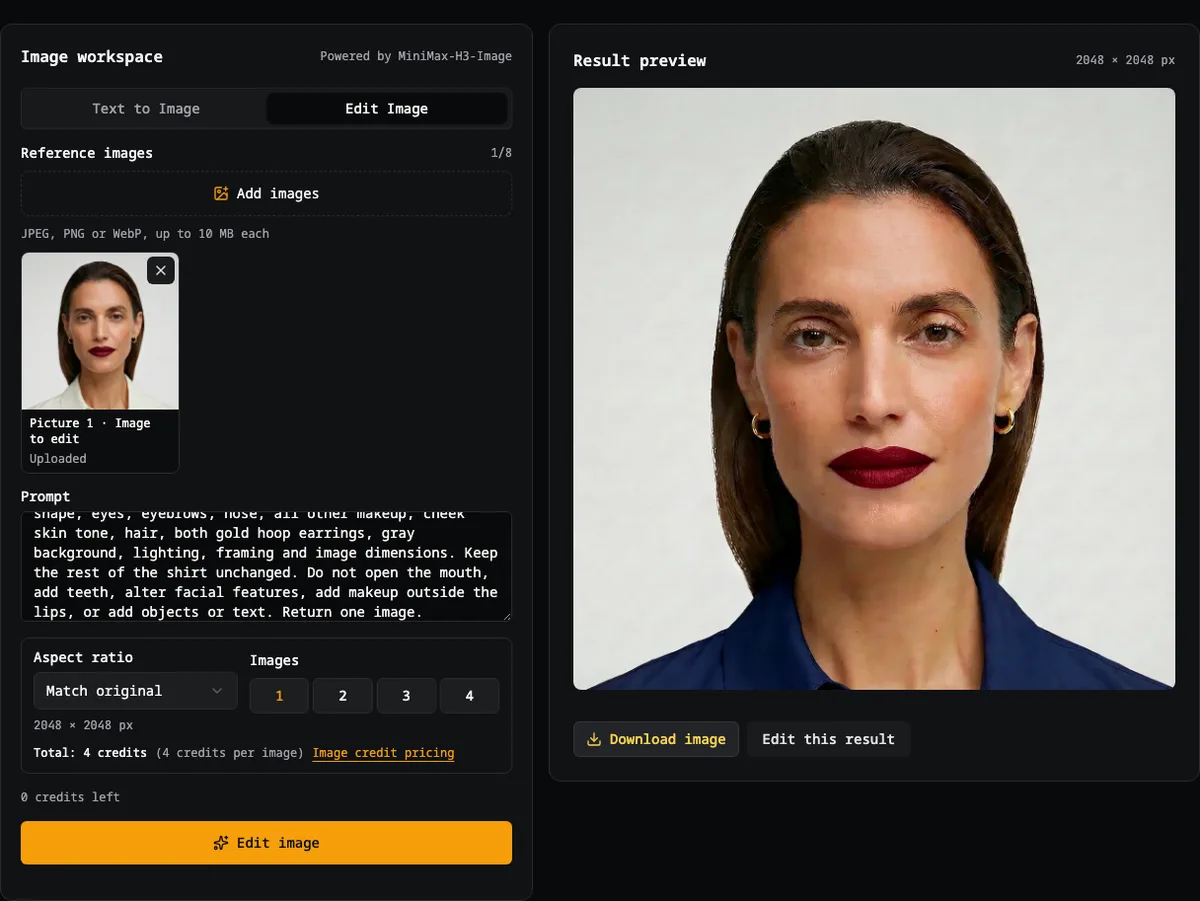
三次编辑实际消耗 3 × 4 = 12 测试积分,未观察到退款。新任务仍以当前报价为准,可查看图片积分预算安排用量。
下载完整结果核对
三张均保留 2048 × 2048 原尺寸,移除了生成元数据,解码 RGB 像素已逐张核对,与各自实际下载结果一致。重新编码改变了文件字节,因此它们是去元数据的下载文件,不是 raw 字节原件。请下载完整 PNG 检查文字、纹理与非目标区域,不要只看缩小预览。
5. MiniMax H3 Image 应该从原图重做,还是接着结果改?
如果前一次结果已有不想保留的变化,可以回到来源,避免把那些输出像素作为下一次参考。如果希望沿用已经完成的修改,则选择前次结果继续。两种情况下都应描述希望得到的最终状态,明确保留范围,再检查整幅结果。本次 G3 的蓝色肩部就没有满足保留要求。
G1/G2/G3 记录的 seed 分别为 3729801662/1498560151/1871146595,网页没有提供 seed 控制。不同随机种子、实际扩写的差异,以及 WebP 与 PNG 输入编码,限制了这组单例比较。不能据此认定连续编辑导致扩色、给两条路径作一般排名,或推算人物身份保持程度。minimaxh3.info 是独立网站,与 MiniMax 官方网站分开运营。