Need to change an existing event date? In one website edit, NOV 21 became NOV 22 while the other three transcribed lines matched, with visible changes beyond the date. See the date-edit result and limits.
Start with a short headline, then proofread the image at the size people will actually see. This example shows NIGHT SIGNAL, two English words on a portrait poster. The spelling is correct in this output; it does not establish reliable rendering of longer sentences or other languages.
The full poster below comes from a documented MiniMax H3 Image R1 run on November 12, 2026, in our isolated model test setup. It was not a new order through the production website’s login and credit flow. This tutorial reviews that existing output, explains how to try its prompt in the current workspace, and follows up with a separate Chinese-headline edit and a four-line event-poster test. A new generation can differ.
minimaxh3.info is an independent service, not MiniMax’s official website. The article cover is an explanatory illustration; the poster and headline crop below are the actual sample being reviewed.
1. Look at the full poster before borrowing its prompt
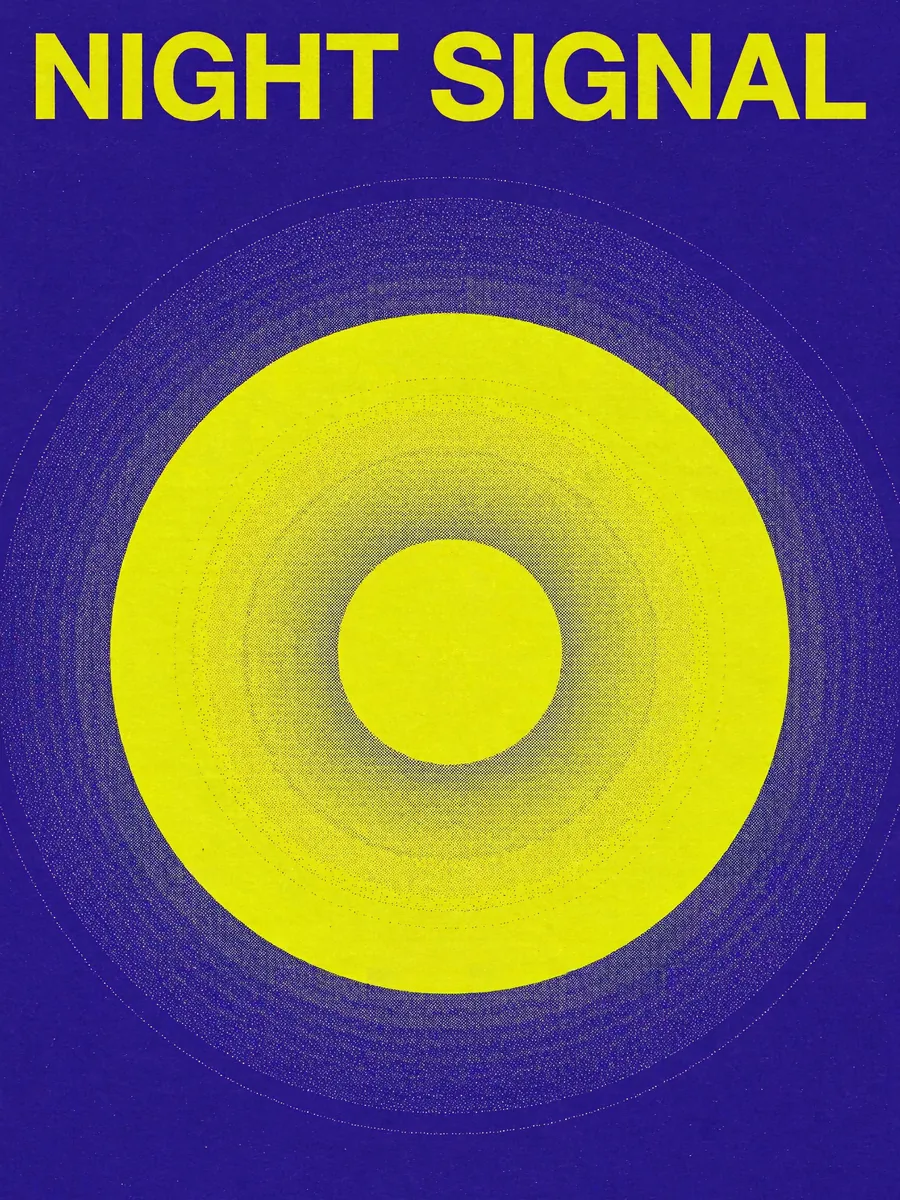
Existing model output, not the article cover. The original is 1728 × 2304 pixels, 3:4. Open the full-size PNG to inspect the lettering and edges.
The sample uses a fictional evening music event. It deliberately contains no date, venue, ticket link or organizer details. That makes it a layout and short-text example, not a complete event announcement ready to publish.
What is visible in this image:
- The headline reads NIGHT SIGNAL, with all eleven letters present and in the correct order, separated into two words on one line.
- Large, heavy yellow capitals stand apart from the dark violet-blue background. There is no smaller competing text to decipher.
- A circular speaker-like graphic occupies most of the lower area. There is open space between the headline and the upper sound rings.
- The title is close to the left and right edges. The prompt requested generous margins, but you should not treat that request as a measured safe area.
2. How do you prompt MiniMax H3 Image to spell an exact poster headline?
Open the poster example to compare the published sample with its prompt. To make a new image, use Text to Image, paste the prompt below, choose 3:4 and request 1 image.
Create a striking portrait-format two-ink screen-printed event poster for a fictional independent evening music event. Deep saturated cobalt-violet paper with warm neon lemon-yellow ink. One huge circular stylized yellow speaker cone in the center, concentric rippling sound rings fading into a halftone pattern, editorial graphic design, confident clean grid, and subtly tactile ink grain. The only visible text on the entire poster must be the exact two words NIGHT SIGNAL, set on one line in large, highly legible heavy yellow uppercase sans-serif type near the top, with generous margins. Spell NIGHT SIGNAL exactly. No other letters, numbers, text, dates, logos, or signatures. Leave space around the headline. Keep the graphic bold and uncluttered.The prompt specifies the exact words, a single line, uppercase lettering and a restricted two-color design. It also excludes extra letters, dates and logos. Those are instructions to inspect against the result, not guarantees that every generation will obey them.
The original run used seed 352201. This is provenance information, not a step requiring a seed field in the current public workspace. Keeping the same words and settings does not promise an identical image.
3. Check the canvas and the current credit total
| Menu setting | Current workspace canvas | What this example establishes |
|---|---|---|
| 3:4 portrait | 1728 × 2304 px | The documented poster was generated at this size. |
| 1:1 square | 2048 × 2048 px | Available canvas; this poster has not been regenerated in square format for this tutorial. |
| 9:16 portrait | 1536 × 2720 px | Available canvas; a different composition, not a crop proven by this example. |
Choose the placement before generating. Cropping a 3:4 image to another aspect ratio can remove letters or shrink the headline relative to the graphic. These canvas sizes are the hosted workspace’s settings, not a claim of 4K output or the full capabilities of MiniMax’s official model/API.
On November 13, 2026, the verified workspace rate was 3 credits per requested text-to-image output: 1 image costs 3 credits and 4 images cost 12 credits. Editing is a separate mode and was 4 credits per requested output. The rate is configured at runtime, so check the workspace’s current total before submitting; the current quote takes precedence. Credits are not a fixed dollar-per-image price—see the current plans.
This historical poster’s isolated model run did not establish a production debit, checkout or turnaround time. You need sufficient credits for the displayed quote when making your own request.
Before printing: placing the original 1728 × 2304 PNG at 300 pixels per inch, without enlarging it, gives about 5.76 × 7.68 inches. Follow your print provider’s template for final crop, bleed and safe margins. This sample has not been tested in print.
4. Proofread the headline separately from the composition

This is a crop of the existing output for inspection, not another generation. The letters were not corrected, redrawn or rearranged.
Check N-I-G-H-T, the word space, then S-I-G-N-A-L. Look for missing or repeated strokes rather than accepting a word because its overall shape seems familiar. In this sample, the visible headline matches the requested words.
In a 320-pixel-wide raster preview, the two words remained distinguishable in our visual review. This was a resized-image check, not a physical-phone or user study.
Next, reduce the full image to the width of the intended phone placement—for example, 320 or 360 CSS pixels—and read it without zooming. Check the full poster, not only this enlarged crop. Confirm that the title remains distinguishable from the rings, the space between words is clear, and the app’s preview or crop does not cut either edge. This article does not establish a named font, an editable font size, a contrast certification or a user readability test.
For a real event, verify the final date, venue and ticket information before publishing, and use an editor where you can control the text exactly if corrections are needed. The original NIGHT SIGNAL sample did not test these fields, small print or long sentences. Section 5 tests one Chinese headline edit; neither short-title sample establishes accuracy for a complete event announcement.
5. Can MiniMax H3 Image replace an existing poster’s English headline with Chinese?
To test a follow-up to the English poster, we supplied the original NIGHT SIGNAL image as the first reference and asked to replace the title with 夜间信号. The request also specified what to preserve: a bold yellow headline at the top, the speaker graphic, halftone rings, portrait layout and purple background. It excluded all English lettering, subtitles, dates, logos and other text.
The November 14, 2026 run used the image-edit workflow with one reference, 1728 × 2304 requested dimensions and seed 352162. The source was the original poster PNG, converted to WebP before being supplied to the model. This was one request with one output and no rerun, in the isolated model setup; it did not test the production website’s login, credit debit or queue. It is a single observed edit, not a success-rate measurement.
Here is the complete edit prompt used in that request:
Edit the supplied poster in <Picture 1>. Replace the entire English headline "NIGHT SIGNAL" with the exact four simplified Chinese characters "夜间信号" on one horizontal line. Keep a bold yellow headline in the same top area, with all four characters inside the edges. Keep the speaker graphic below, its halftone rings, the vertical layout, and the purple background. Remove all English lettering. Add no subtitle, date, logo or other text.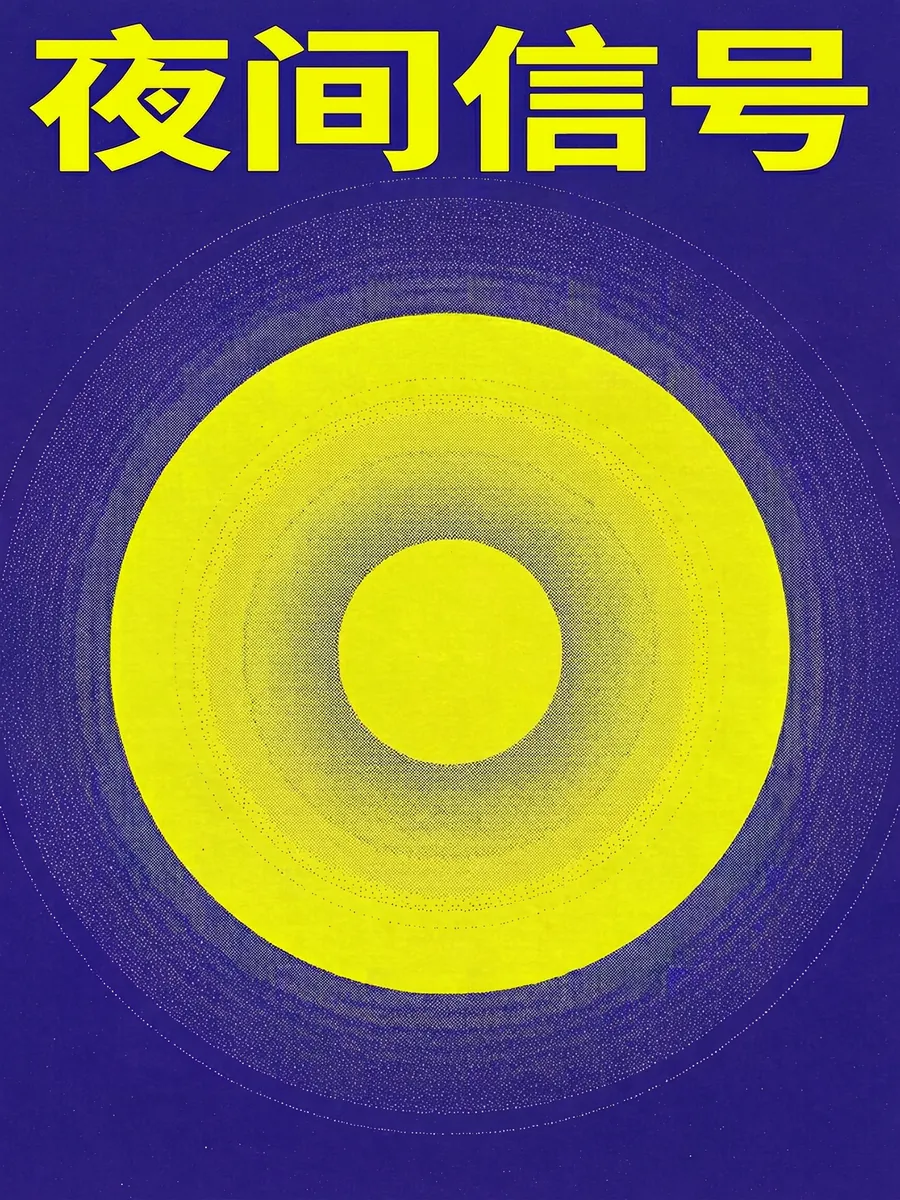
The image-edit output from this single request. The returned PNG is 1728 × 2304 pixels; this article displays a 900 × 1200 WebP.
In the returned image, the four characters 夜间信号 are distinguishable on one horizontal line, and no English lettering is visible. All four characters are inside the canvas, although the side margins remain narrow. The circular speaker and halftone rings below are still recognizable. That supports this specific short-title replacement; it does not show that the composition stayed pixel-identical or that longer Chinese copy will work equally well. Proofread the full image at the intended display size before publishing.
To try this edit yourself, open the H3 Image workspace, choose Edit Image, and upload the original poster as Picture 1 / Image to edit. Paste the prompt, choose 3:4 and 1 image, then check the current credit total before submitting. Keep the source image and requested changes together; generating from the words alone tests a different task.
6. Decide whether to keep the result
Keep a candidate only after checking the original PNG and its final phone-sized placement. If a letter is wrong or the headline is clipped, do not publish it as-is. Shorten the requested copy, leave more space, or place the exact text in a conventional editor. A new generation may use more credits and can still need correction; a completed image that you dislike is not automatically a failed, refunded task.
Opening the example or workspace does not generate an image.
7. Can a poster spell dates, times and prices?
A short title leaves an important event-poster task unanswered: keeping the date, time and price correct in the same image. On November 16, 2026, we made one new text-to-image request for a four-line version: NIGHT SIGNAL / NOV 21 / DOORS 8 PM / $12. This is a fictional event; $12 is its fictional ticket price, not the price of generating an image.
The isolated model run requested 1728 × 2304 pixels, 3:4, one image, with seed 352163. There was one request and no rerun. It did not test the production website’s login, credit debit or queue. The workflow used TextGenerateV2 to expand the submitted input; the expanded description retained the four text fields and their order. The code block below is the complete submitted input, including its line breaks:
Create a portrait-format two-ink screen-printed poster for a fictional independent evening music event. Use a deep cobalt-violet background and warm bright lemon-yellow ink. Place an abstract circular speaker graphic and halftone sound-wave rings below a clear four-line text block. Keep the layout bold, uncluttered and visually balanced, with generous margins around all text. The only visible text on the entire poster must be exactly these four lines, in this order, with one line per item:
NIGHT SIGNAL
NOV 21
DOORS 8 PM
$12
Render all four lines in large, highly legible bold yellow sans-serif type. Keep the complete text block inside the image edges. Spell every word exactly and preserve every number, the dollar sign, and the spaces shown above. Do not add or omit characters. Add no other letters, numbers, words, dates, logos, signatures, watermarks or text. This is a fictional graphic-design sample.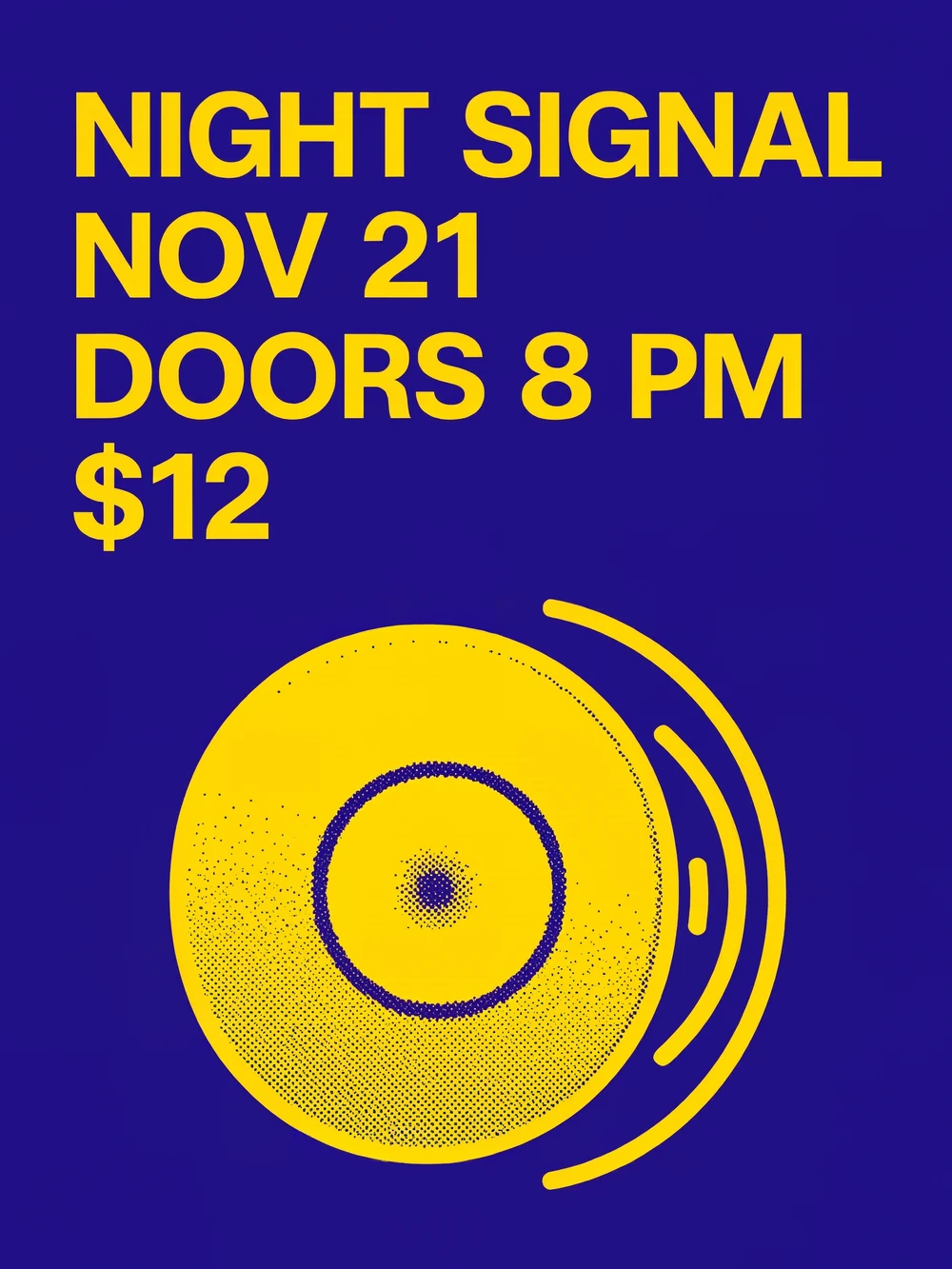
The new output, displayed as a 1000 × 1333 WebP preview. Download the full-size 1728 × 2304 PNG to inspect the text. This is a separate generation, not a text overlay added to the earlier poster.
An independent reader transcribed the original image before reading the prompt or expected wording. Comparing that record with the request gives:
| Line | Requested text | Independently transcribed text | Check |
|---|---|---|---|
| 1 | NIGHT SIGNAL | NIGHT SIGNAL | Matches |
| 2 | NOV 21 | NOV 21 | Matches |
| 3 | DOORS 8 PM | DOORS 8 PM | Matches |
| 4 | $12 | $12 | Matches |
The original-image review found four lines in the requested order, with no visible extra text or clipped characters. The text is left-aligned, yellow against purple, with the speaker graphic below. In separate visual reviews of the whole poster resized to 320 × 427 and 375 × 500 pixels, all four lines remained readable, without wrapping or clipping. These are image reviews, not a physical-phone reading study. This one output supports four short information lines; it does not establish accuracy for dense paragraphs, a long invitation, another language or a repeatable success rate.
To try your own version, open the H3 Image workspace, choose Text to Image, paste the full prompt and replace the four lines with your event’s verified details. Select 3:4 / 1 image and check the current credit total before submitting. Read every date, time, currency sign and digit in the downloaded image, then inspect the full poster at its intended display width. Correct any wrong text in a conventional editor before publishing; do not rely on a plausible-looking word or number.
8. Can MiniMax H3 Image change a poster date and keep the other text?
One website edit changed NOV 21 to NOV 22, while NIGHT SIGNAL, DOORS 8 PM and $12 remained readable. Letter edges, the background texture and speaker details also changed.
On November 18, 2026, we signed in and edited section 7's four-line PNG using Edit Image / 3:4 / 1 image. One upload and one creation produced a single completed 1728 × 2304 output, downloaded without rerunning or text repair.
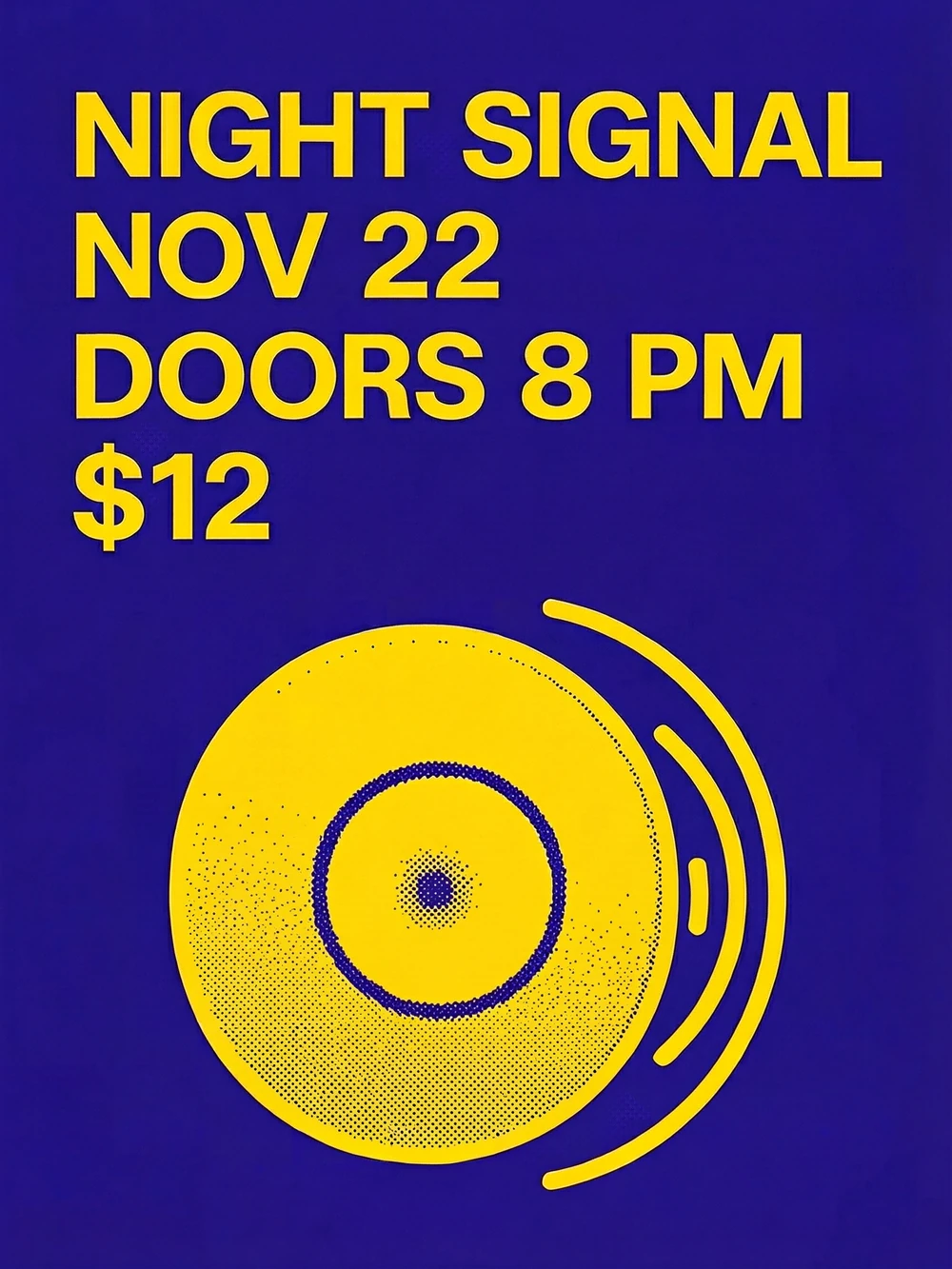
Download the full-size edited PNG, about 5.7 MB (5,670,482 bytes). Its generation metadata was removed; decoded pixels match the native edited output.
Complete submitted prompt
Edit <Picture 1>, the supplied fictional event poster. Change only the date line from "NOV 21" to "NOV 22". Keep the other three lines exactly as they are: "NIGHT SIGNAL", "DOORS 8 PM", and "$12". Keep the four-line order, line breaks, left alignment, type style, letter size and spacing, yellow ink, violet background, circular speaker graphic, halftone rings, overall framing and 3:4 portrait composition. Remove the old date completely; show the new date once in the same location. Do not add any other text, symbols, logos, watermarks, borders or objects. The target image is the same fictional event poster with the date changed to "NOV 22" and all other visible content preserved as closely as possible.The service normalized the PNG to a same-size WebP. We compared that actual reference; the uploaded and normalized files differ. The executed seed and expanded prompt remain unknown.
Read the text, then inspect the design
An independent AI visual reader transcribed two neutrally named images presented in randomized order before this section was drafted, without seeing the prompt or target edit. We sealed its transcript before revealing which was the input and output.
| Line | Input | Output |
|---|---|---|
| 1 | NIGHT SIGNAL | NIGHT SIGNAL |
| 2 | NOV 21 | NOV 22 |
| 3 | DOORS 8 PM | DOORS 8 PM |
| 4 | $12 | $12 |
No uncertain or additional text was reported. Post-seal review found no old-date residue or clipping; all lines were readable in local 320/375-pixel-wide full-image previews, not website or physical-phone tests.
All lettering gained fine light edges and darker outlining/shadows. The blue-violet background grew grainier and mottled; speaker dots and edges changed. Four-line order and three-arc composition looked similar; exact spacing/geometry were unmeasured. No internal cause was established.
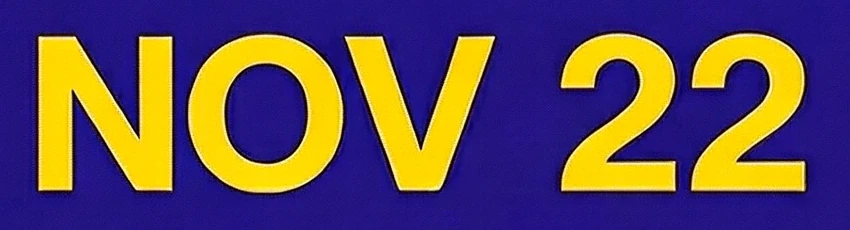
Output inspection crop: x100, y350, 850 × 230 pixels, taken after generation, not an uploaded mask.
Cost and trying your own edit
This controlled website test was quoted and charged 4 credits drawn from a test grant, with no refund; it was not a customer purchase. $12 is the fictional ticket price, not the editing fee. Your current workspace quote takes priority.
- Download the source PNG above, open MiniMax H3 Image, sign in and select Edit Image.
- Upload it as Picture 1; select 3:4 / 1 image.
- Paste the prompt. For your own poster, replace both dates and every string to preserve.
- Check the current quote and balance, then actively click Edit image. Opening the link does not generate anything.
- Download and inspect the full result and its intended display size. This workspace has no mask or brush tool; use a conventional editor if the rest must remain exact. One result does not establish repeatability.