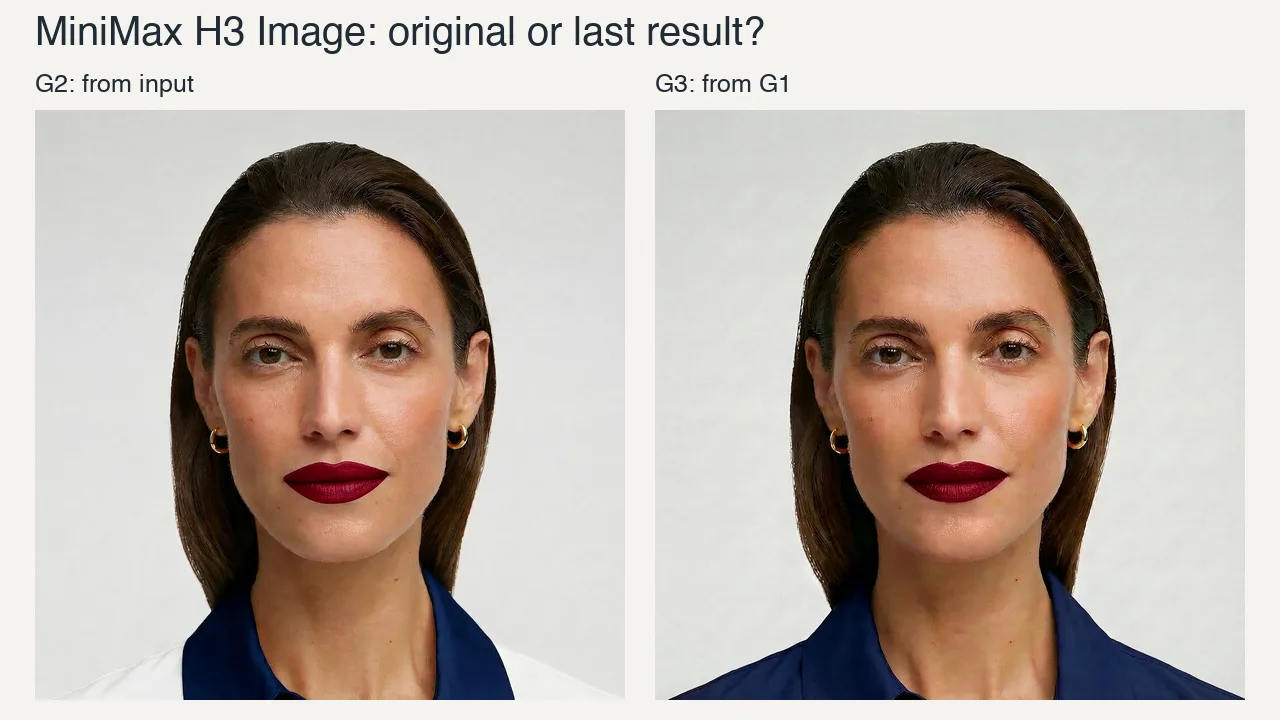
In three real MiniMax H3 Image edits, both ways of requesting berry-red lips and a navy collar produced those colors. The output made from the previous result also turned the visible shoulders navy, despite instructions to leave the rest of the shirt unchanged. Starting again from the source left those shoulders pale in this one comparison.
That is a result to inspect, not a rule that one editing path wins. Each request returned one first output at 2048 × 2048, without a reroll. The cover shows G2 on the left and G3 on the right, with the complete frames fitted side by side.
1. What did the three requests actually use?
A Reddit editing discussion raised the practical question of using the original each time or continuing from the last result. We tested those two input choices with the fictional adult portrait from our lipstick-edit walkthrough. No real-person photo was supplied.
| Result | Picture 1 actually supplied to the edit | Submitted request | Observed result |
|---|---|---|---|
| G1 | Source normalized to WebP | Change only the lips to berry red | Berry-red closed lips; collar stays pale |
| G2 | A second, byte-identical normalized source | Berry-red lips and navy collar; keep the rest of the shirt | Berry-red closed lips, navy collar, pale shoulders |
| G3 | G1’s original PNG result asset, through Edit this result | Exactly the same prompt as G2 | Berry-red closed lips; navy extends onto the visible shoulders and bottom edge |
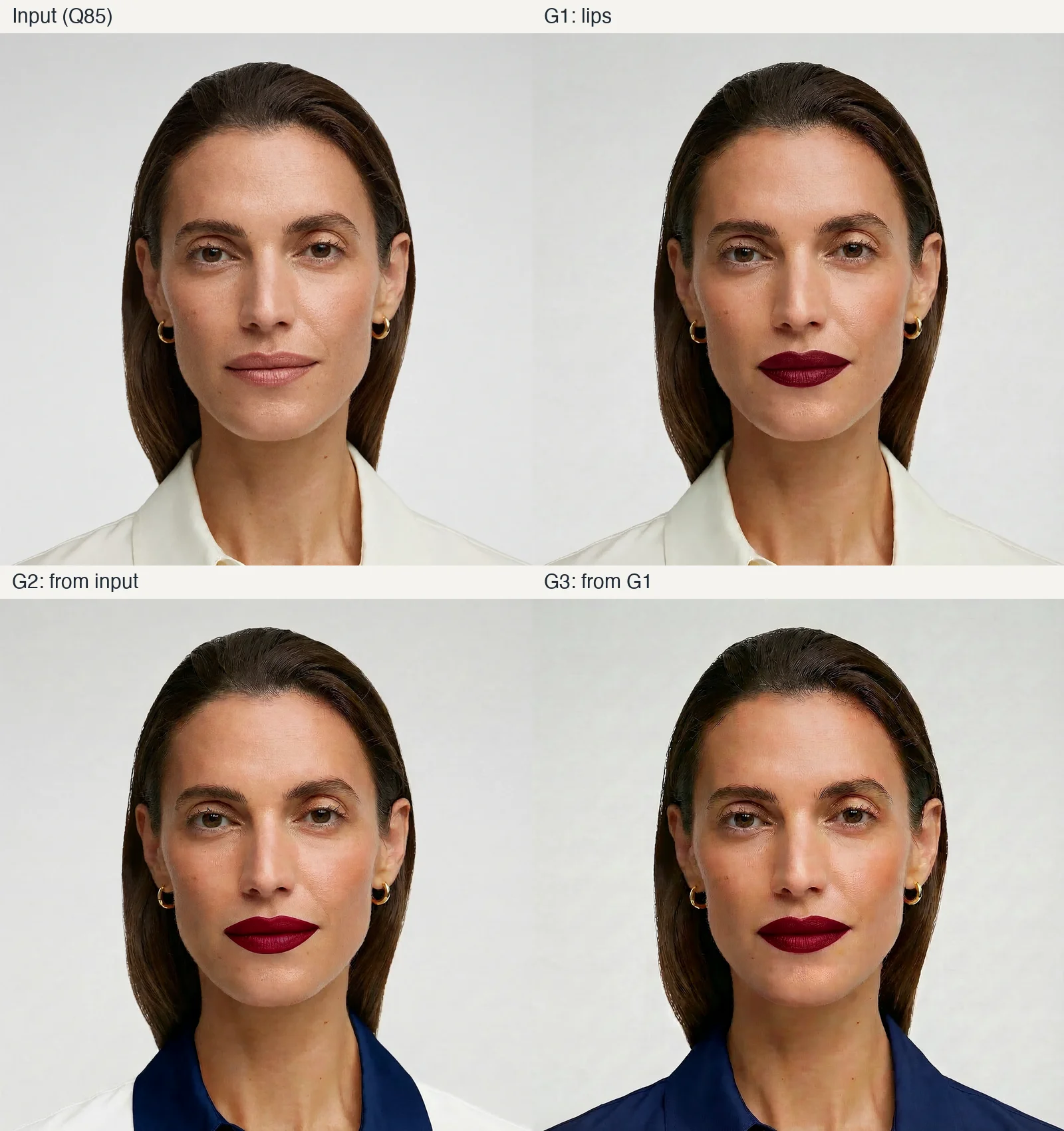
Reading composite, reduced to 1600 × 1700. Each portrait keeps its complete frame. The regional strips below are labeled crops; none of these compressed WebP illustrations was used for numerical sampling.
The uploaded source WebP was 647,430 bytes, encoded at quality 95. Two normal website uploads prepared the G1 and G2 references. The service normalized both to quality-85 WebP: 270,574 bytes, with identical file bytes. This actual normalized reference is the measurement baseline, rather than the uploaded Q95 file or a reading preview.
For G3, we did not upload a downloaded PNG again. The website reused G1’s original result asset. Its smaller on-page preview was not the model input.
2. The complete submitted prompts
G1 — lips only, 548 Unicode code points:
Edit <Picture 1>. Change only the lipstick color on the visible closed lips to a rich berry red, a deep red with a subtle purple undertone. Keep the lip outline, mouth position, closed-mouth expression and skin texture unchanged. Preserve the face shape, eyes, eyebrows, nose, all other makeup, cheek skin tone, hair, both gold hoop earrings, ivory shirt collar, gray background, lighting, framing and image dimensions. Do not add makeup outside the lips, change facial features, open the mouth, add teeth, or add objects or text. Return one image.G2 and G3 — identical 596-code-point instructions:
Edit <Picture 1>. Set the lipstick on the visible closed lips to a rich berry red, a deep red with a subtle purple undertone. Set only the shirt collar to deep navy blue. Keep the lip outline, mouth position, closed-mouth expression and skin texture unchanged. Preserve the face shape, eyes, eyebrows, nose, all other makeup, cheek skin tone, hair, both gold hoop earrings, gray background, lighting, framing and image dimensions. Keep the rest of the shirt unchanged. Do not open the mouth, add teeth, alter facial features, add makeup outside the lips, or add objects or text. Return one image.G3 therefore restated the desired lip color even though G1 already had berry-red lips. We did not test a shorter “collar only” follow-up. These two blocks are the typed instructions, not the expanded model inputs.
Matched task-history records supplied the actual expansions for all three runs. G2 explicitly said “while the rest of the shirt remains white.” G3 instead said “its identity and the rest of the shirt material remain, while the collar color is changed to deep navy blue.” It did not explicitly restate that the rest of the shirt should remain white. That difference is observable, but cannot alone explain the blue shoulders: the seed and input image also differed.
Recorded model-input expansions
These are the complete recorded workflow texts for these runs, not additional typed instructions or a new workspace control. “Preserved” in these texts is an instruction, not a measured result. The normalized G1/G2 references had the same SHA-256: 2b06200a3b7d4b60.
G1 — recorded expansion:
The woman in <Picture 1> is <Subject 1>. The target image shows <Subject 1>. <Subject 1> is partially preserved; the lipstick color on the visible closed lips changes to a rich berry red, while the lip outline, mouth position, closed-mouth expression, face shape, eyes, eyebrows, nose, cheek skin tone, hair, both gold hoop earrings, ivory shirt collar, gray background, lighting, framing and image dimensions remain unchanged. The visible closed lips on <Subject 1> now display a rich berry red lipstick color, a deep red with a subtle purple undertone.G2 — recorded expansion:
The woman with brown hair and brown eyes in <Picture 1> is <Subject 1>. The white shirt collar in <Picture 1> is <Subject 2>. The lips in <Picture 1> are <Subject 3>. The gold hoop earrings in <Picture 1> are <Subject 4>. The gray background in <Picture 1> is <Subject 5>. The target image depicts the woman with modified lip color and collar color against the gray background. <Subject 1> is partially preserved; facial features, expression, skin texture, hair, and earrings remain identical while the lipstick color on the lips changes. <Subject 2> is partially preserved; the collar material remains unchanged while the color changes to deep navy blue. <Subject 3> is changed to a rich berry red with a deep red hue and subtle purple undertone. <Subject 4> is fully preserved. <Subject 5> is fully preserved. The lips maintain a closed-mouth expression with the original outline and mouth position, now covered in the rich berry red lipstick. The shirt collar area transitions from white to a deep navy blue tone, while the rest of the shirt remains white. The lighting and shadows on the face and neck remain consistent with the original source image.G3 — recorded expansion:
The woman in <Picture 1> is <Subject 1>. The visible shirt collar in <Picture 1> is <Subject 2>. The closed lips with lipstick in <Picture 1> are <Subject 3>. The target image shows <Subject 1> with <Subject 3> set to a rich berry red, a deep red with a subtle purple undertone, applied precisely to the visible closed lips. <Subject 1> is partially preserved; its identity, face shape, eyes, eyebrows, nose, all other makeup, cheek skin tone, hair, both gold hoop earrings, closed-mouth expression, lip outline, mouth position, and gray background remain, while the lipstick color on <Subject 3> is altered. <Subject 2> is partially preserved; its identity and the rest of the shirt material remain, while the collar color is changed to deep navy blue. <Subject 3> is partially preserved; its lip outline, mouth position, closed-mouth expression, and skin texture remain unchanged, while the pigment is set to the rich berry red tone. The lighting and framing remain consistent with the source image.3. Check beyond the requested color

The lip crop is x=850, y=1210, width=390, height=160 in each 2048 × 2048 file. The strip preserves source → G1 → G2 → G3 order.
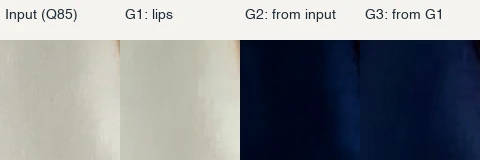
For two fixed regions, the per-channel RGB medians were:
| Region: x, y, width, height | Normalized input | G1 | G2 | G3 |
|---|---|---|---|---|
| Upper lip: 925, 1242, 220, 34 | 149, 78, 67 | 84, 4, 16 | 95, 0, 11 | 87, 0, 11 |
| Left collar: 650, 1800, 120, 120 | 193, 190, 178 | 191, 191, 177 | 0, 8, 30 | 5, 19, 48 |
Medians summarize each channel separately. The collar readings confirm a local color change; that small box cannot establish what happened to the whole shirt. The shoulder spill in G3 is a full-frame visual observation, with no additional shoulder measurement.
Non-target pixels changed too. In the fixed left-cheek region (680, 1010, 130, 140), mean absolute RGB-channel difference from the normalized input was 5.450 for G1, 6.117 for G2 and 7.356 for G3. This measure averages absolute differences at corresponding pixel coordinates across all three channels, on a 0–255 channel scale. Files were not aligned or resized for sampling. These values are not face-identity scores or quality thresholds.
4. Reproduce the input choice in the workspace
Open the image workspace. Manually choose Edit Image / Match original / Images: 1. The link does not load the portrait or submit a task. Sign in, upload the source and check the current credit quote before actively submitting.
We first uploaded the same source separately in tabs A and B and verified that the two normalized references were byte-identical. No generation had been submitted at that point. We then submitted G1 in A, followed by G2 in B, and returned to A. After a normal reload, we checked that the displayed result was G1 and clicked Edit this result. Picture 1 then referred to G1’s original 2048 × 2048 asset. We pasted the same G2 prompt and submitted G3. This only verifies the result retained in that tab; it does not promise that every historical result can be recovered.
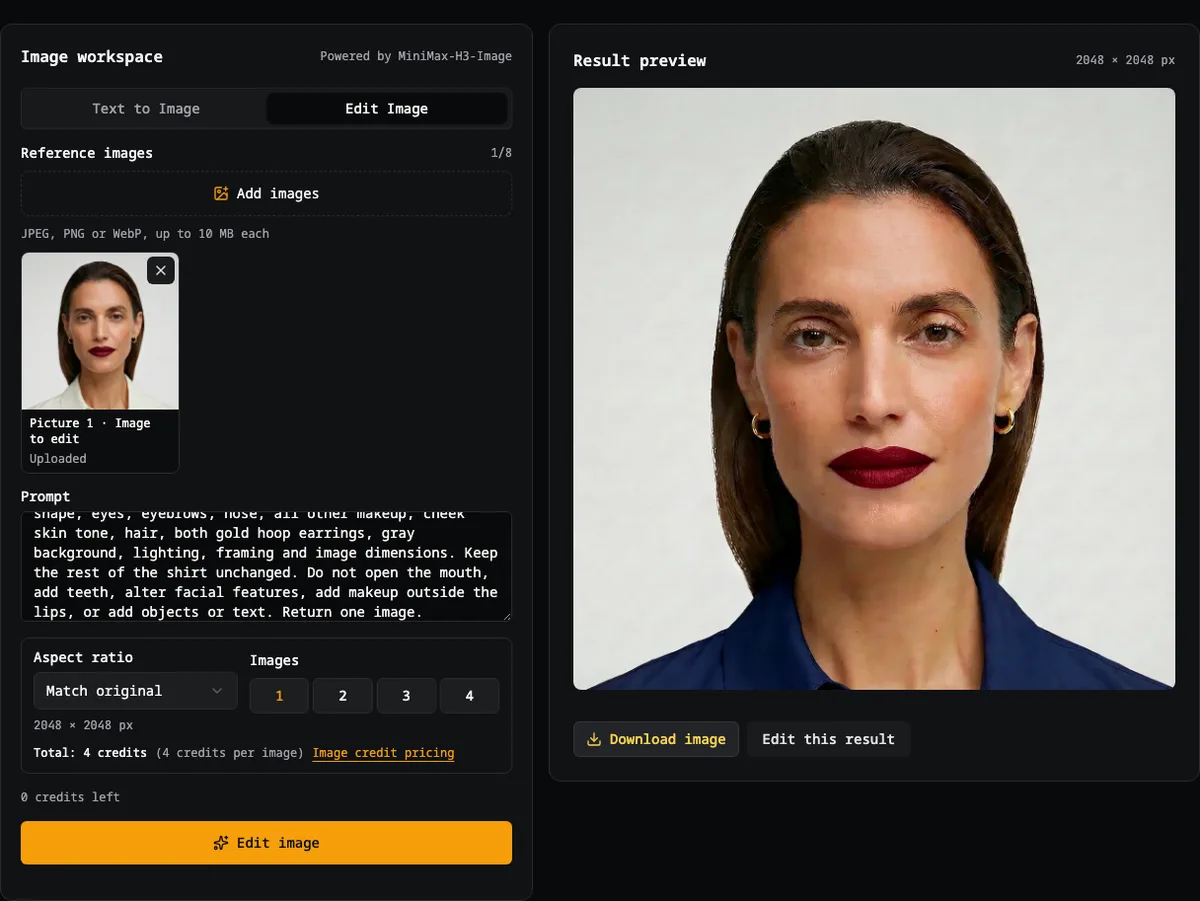
The three edits consumed 3 × 4 = 12 test credits, with no refund observed. For a new request, use the current quote; the image credit budget explains how to plan it.
Download the complete results
- G1 PNG — lips only, 4,276,418 bytes
- G2 PNG — from the source, 4,406,542 bytes
- G3 PNG — from G1, 4,239,425 bytes
All three are 2048 × 2048, with generation metadata removed and decoded RGB pixels verified unchanged from their respective downloaded results. Re-encoding changed the file bytes: these are metadata-cleaned downloads, not raw byte-identical originals. Inspect the complete PNGs for lettering, texture and changes outside the target area.
5. Which input should I choose in MiniMax H3 Image?
Return to the source when you want a fresh attempt without using an unwanted earlier output as the reference. Use a previous result when its existing changes are part of what you want next. In either case, describe the desired final state and name what must stay unchanged, then inspect the whole result. Here, G3’s blue shoulders failed that last requirement.
The recorded seeds were 3729801662 / 1498560151 / 1871146595 for G1/G2/G3; the website did not provide seed control. Different seeds, different recorded expansions and WebP-versus-PNG inputs limit this single comparison. It cannot establish that chaining caused the spill, rank the paths generally, or measure preservation of a person’s identity. minimaxh3.info is an independent website, separate from MiniMax’s official site.