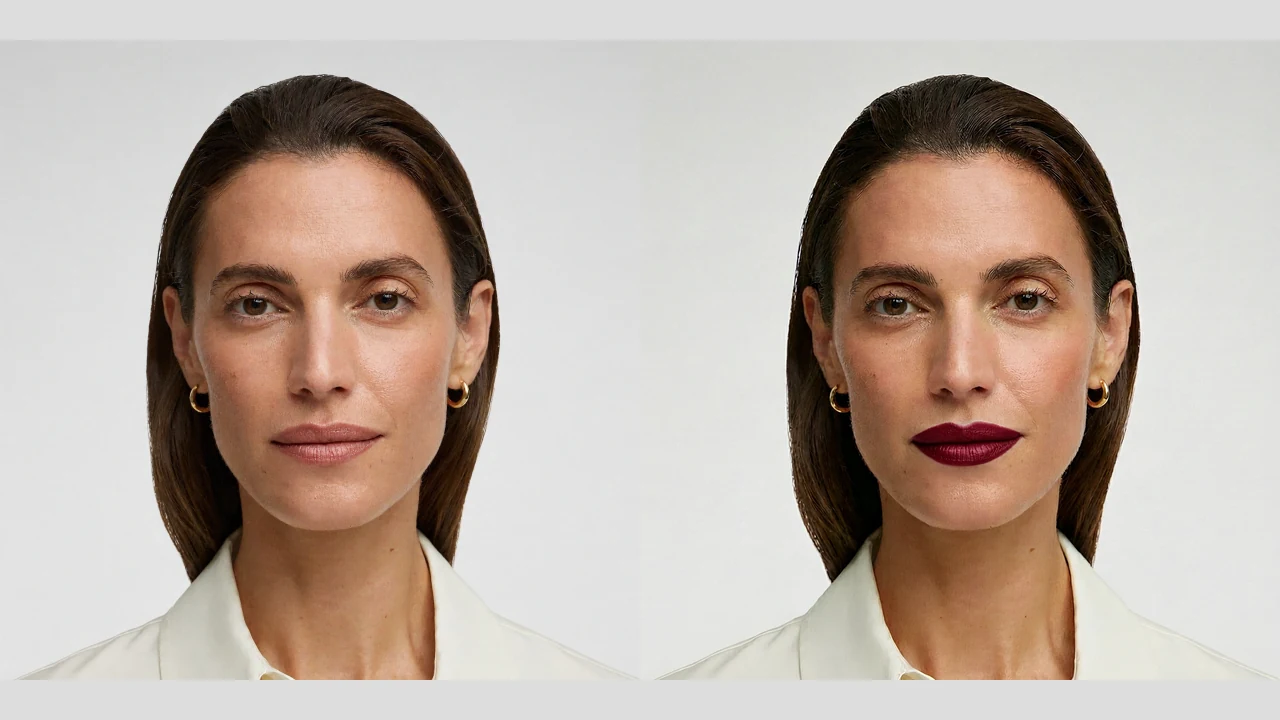
In one MiniMax H3 Image edit, the generated portrait’s nude-pink lips became dark berry red. The lip edge also looked heavier, and eyebrow and under-eye detail changed.
We first generated one fictional adult portrait, then edited that image once. No real-person photo was supplied. The cover shows the complete actual edit reference on the left and the complete output on the right, reduced to fit; it does not crop away the surrounding face.
1. Make a source portrait, or use the recorded reference
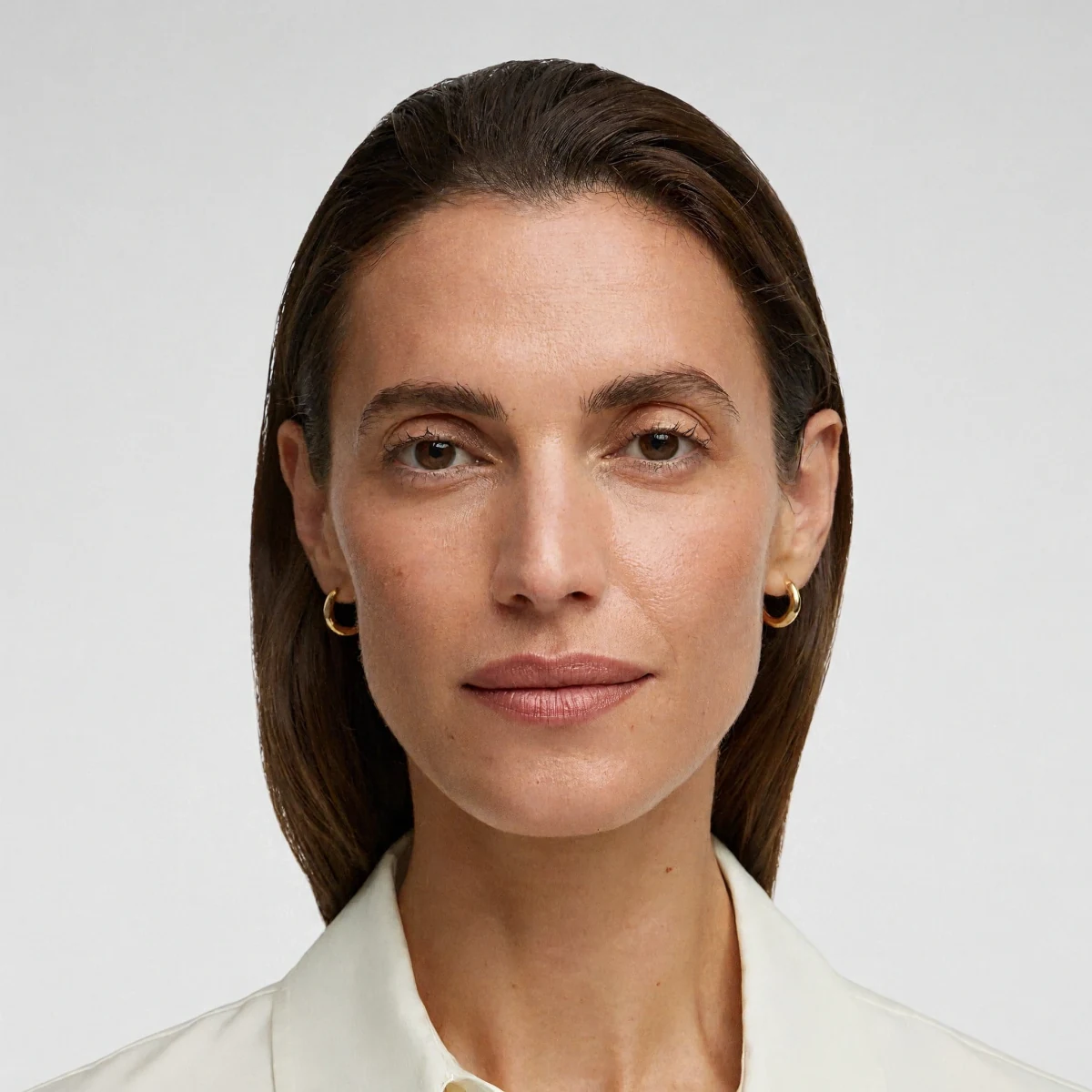
This is a 1200 × 1200 reading preview, not the file used for measurement. The first stage requested one fictional adult, approximately 30 years old, with closed visible lips, subtle eye makeup, two gold hoop earrings, an ivory collar and a light gray background.
Complete first-stage prompt:
Create an original photorealistic beauty studio head-and-shoulders portrait of one fictional adult woman, approximately 30 years old, facing straight toward the camera with a relaxed neutral expression. Both lips are gently closed, fully visible and clearly outlined, with muted natural nude-pink lipstick and no open mouth or teeth. Neutral subtle eye makeup, natural skin texture, dark brown hair tucked behind both ears. Wear a small gold hoop earring on each ear and a plain ivory collared shirt with the collar clearly visible. Soft even frontal studio lighting, plain light gray background, centered symmetrical composition, full head and shoulders in frame. No real person reference, celebrity likeness, brand, text, watermark or additional people.Recorded settings: MiniMax H3 Image / Text to Image / 1:1 / one output / seed 352231. The request and returned PNG were 2048 × 2048. Download the full-resolution first-stage PNG to inspect that generated source.
For the second stage, that PNG was transcoded to a full-size WebP at quality 95, without cropping or retouching. This is a lossy conversion, not a byte-identical PNG. The actual edit input is this 2048 × 2048 WebP (647,430 bytes, SHA-256 beginning 8d95e1bbe97a). All input/output measurements below use that submitted WebP, not the earlier PNG.
2. Request berry-red lips and list what should stay
Complete second-stage prompt:
Edit <Picture 1>. Change only the lipstick color on the visible closed lips to a rich berry red, a deep red with a subtle purple undertone. Keep the lip outline, mouth position, closed-mouth expression and skin texture unchanged. Preserve the face shape, eyes, eyebrows, nose, all other makeup, cheek skin tone, hair, both gold hoop earrings, ivory shirt collar, gray background, lighting, framing and image dimensions. Do not add makeup outside the lips, change facial features, open the mouth, add teeth, or add objects or text. Return one image.Recorded settings: Edit Image / one reference as Picture 1 / 1:1 / one output / seed 352232. It returned one 2048 × 2048 PNG. The named target was a rich berry red with a subtle purple undertone. We did not request an exact RGB value or a commercial lipstick shade.
The model received the whole image and text only. The rectangles used for measurement and comparison were not masks sent to the model. This is not a demonstration of a brush or painted selection in this workspace.
3. Check the lip boundary and gloss, not just the new color
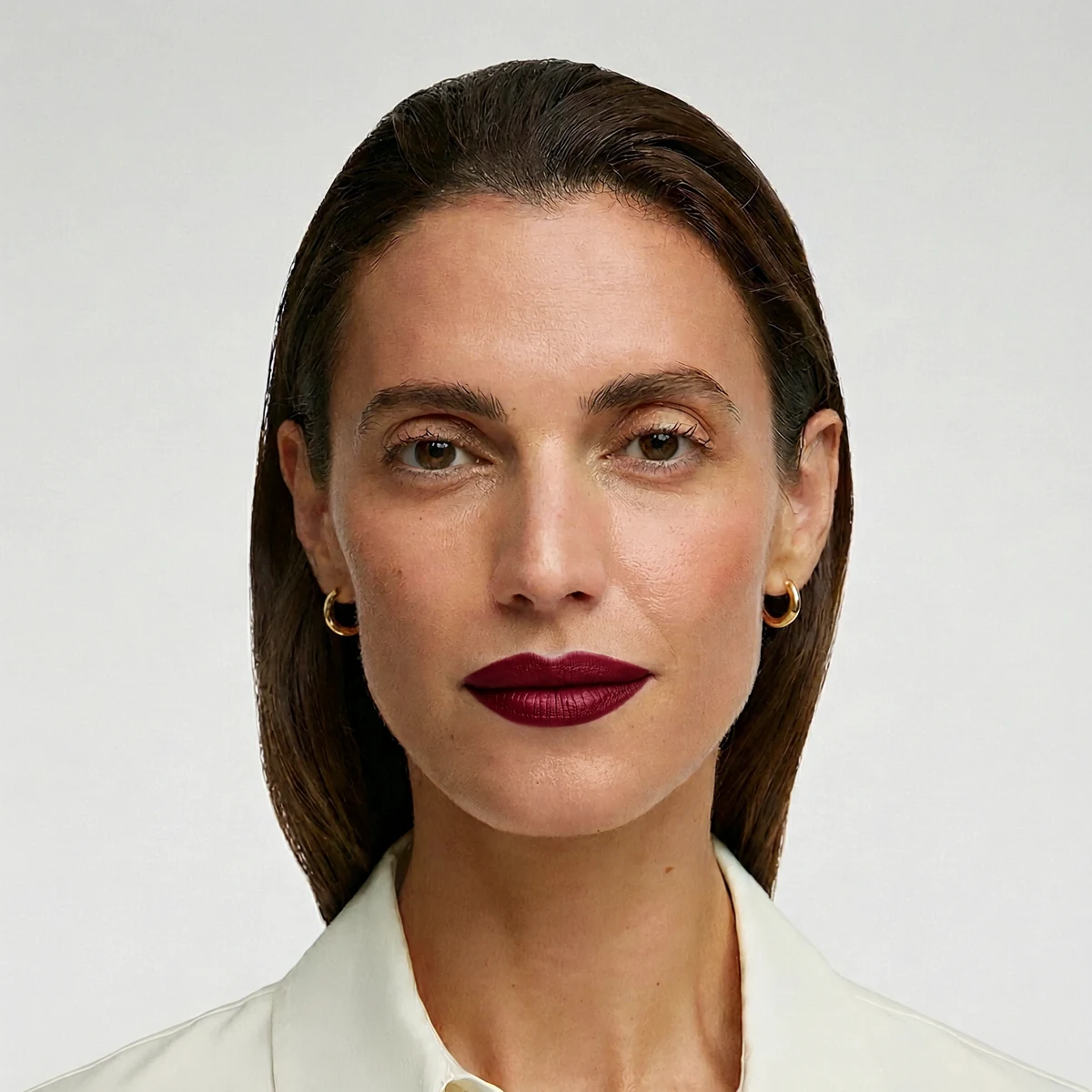
This is a 1200 × 1200 compressed preview. Download the full-resolution edited PNG for inspection. Both downloadable PNGs have generation metadata removed while retaining the decoded RGB pixels of their respective raw outputs. They are different stage results; the actual editing reference remains the WebP linked above. No facial detail was repaired or recolored afterward.
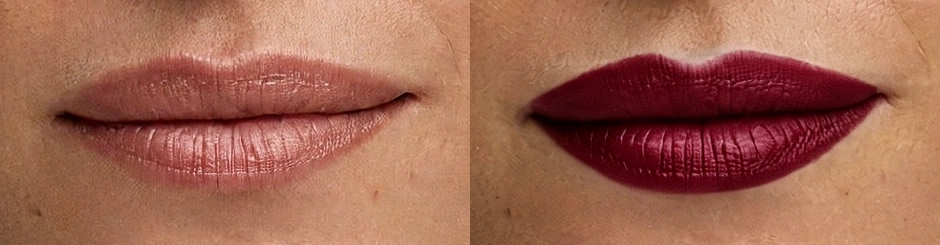
The mouth remains closed and no teeth appear. The color moves visibly toward a dark berry or burgundy red. The edge looks darker and the lower lip appears fuller. These are visual observations, influenced by the darker pigment, rather than a geometric measurement of lip shape. Compare the mouth corners, closed-lip seam and bright lower-lip highlights before accepting the edit.
Each side of this lip comparison is the same 470 × 245 rectangle at x=810, y=1170 in the full-size files. The images were not registered or warped to line up a changed feature. The displayed comparison is WebP-compressed; use the full-resolution downloads for pixel readings.
4. What changed outside the lips?
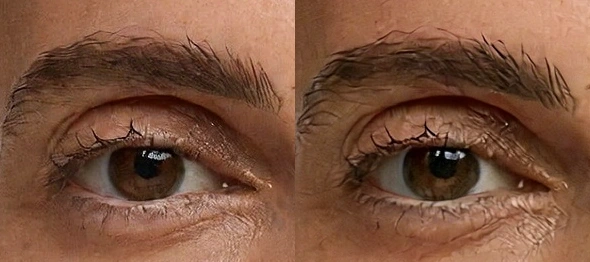
The eyebrow texture and lines below the eye differ. This eye comparison was chosen after viewing the output to explain an unintended change. Each half uses 670, 680, 295, 262 in x, y, width, height order. It is separate from the nine measurement rectangles fixed before editing; we did not score eye makeup or add this crop to those statistics.

Both gold hoops remain visible, but their highlights, edges and nearby skin texture differ. The collar and gray background also remain in broadly the same places while their pixels change. Each half of the earring comparison uses the preselected 550, 1010, 1020, 280 crop. Broad visual continuity is different from leaving those areas untouched.
Fixed pixel readings
Before submitting the edit, we froze nine rectangles on the actual 2048-square WebP. Coordinates start at the top-left. RGB medians are calculated per channel over all pixels in each rectangle; for an even count, the two middle values are averaged. No registration, segmentation or output-dependent repositioning was used.
| Lip rectangle | x, y, width, height | Input median RGB | Output median RGB |
|---|---|---|---|
| Full lip area | 850, 1210, 390, 160 | 165, 98, 81 | 126, 39, 50 |
| Upper-lip interior | 925, 1242, 220, 34 | 150, 78, 67 | 86, 7, 18 |
| Lower-lip interior | 920, 1300, 240, 30 | 185, 111, 102 | 112, 17, 33 |
These three lip rectangles overlap and must not be added together. They describe a darker, redder digital rendering in those locations. A rectangle can include shading or neighboring skin.
For the six other frozen regions, the last column is the mean absolute difference over corresponding RGB channel values: sum the absolute input/output differences and divide by 3 × the number of pixels. Values use the 0–255 channel scale, not percentages or a preservation score.
| Preserved-area check | x, y, width, height | Mean absolute channel difference |
|---|---|---|
| Screen-left cheek | 680, 1010, 130, 140 | 6.641 |
| Screen-right cheek | 1260, 1010, 130, 140 | 6.959 |
| Screen-left earring | 592, 1080, 78, 110 | 7.914 |
| Screen-right earring | 1415, 1070, 85, 130 | 9.820 |
| Screen-left collar | 650, 1800, 120, 120 | 3.359 |
| Screen-left background | 100, 400, 250, 400 | 2.226 |
These readings confirm changed pixels in protected regions. No threshold was set for how much change a viewer would accept.
5. Try your own image, or repeat this example manually
For your own photo: open the MiniMax H3 Image workspace, choose Edit Image and use a photo you have permission to edit. Sign in when required for upload, choose a ratio suitable for that image and one output, and adapt the request to its visible lips and makeup.
For the recorded example:
- Open the actual editing input WebP. If it opens in a new tab, save it to your device. Do not substitute the smaller reading preview.
- In the image workspace, sign in as needed to upload, choose Edit Image, and put that file in Picture 1.
- Choose 1:1 and one output, paste the complete second-stage prompt and check the current credit total and your available balance before actively submitting. This tutorial does not automatically load or generate the lipstick sample.
- Inspect the whole output, then the lip line, gloss, eye area, earrings and collar. An unwanted change in a completed image is different from a failed task; do not assume the edit can be repeated without another charge.
To make a different source portrait, use the first prompt in Text to Image / 1:1 / one output, inspect it and then use that new image as your edit reference. A new source is a new experiment. The recorded seeds identify these isolated runs; the browser steps do not demonstrate a seed control or exact reproduction.
Want to hear this portrait speak? In the single-portrait dialogue test, the berry-lip output is the only starting image for a five-second clip. You can play the original audio and compare it with the requested sentence.
To change the backdrop instead, see the MiniMax H3 Image portrait background test. It uses the same gray input and shows which facial and hair details changed in the first result.
6. Scope of this result
On November 15, 2026, we ran one source generation and one edit through the project's isolated model workflows, with no reroll, selection of a better result or manual repair. Model-weight hashes were not supplied. This is not a production-site login, upload, credit or order test. It does not establish real-person consistency, physical lipstick coverage or color accuracy, or a repeat success rate. minimaxh3.info is an independent service, not MiniMax's official website.
A second edit: original or previous result?
A separate November 16 test used three real website edits to compare starting again from the source with continuing a result in MiniMax H3 Image. The same final instruction requested berry-red lips and a navy collar; the continued result also turned the visible shoulders blue. Inspect the complete frames, submitted prompts and recorded expansions before deciding which input to use for your next change.