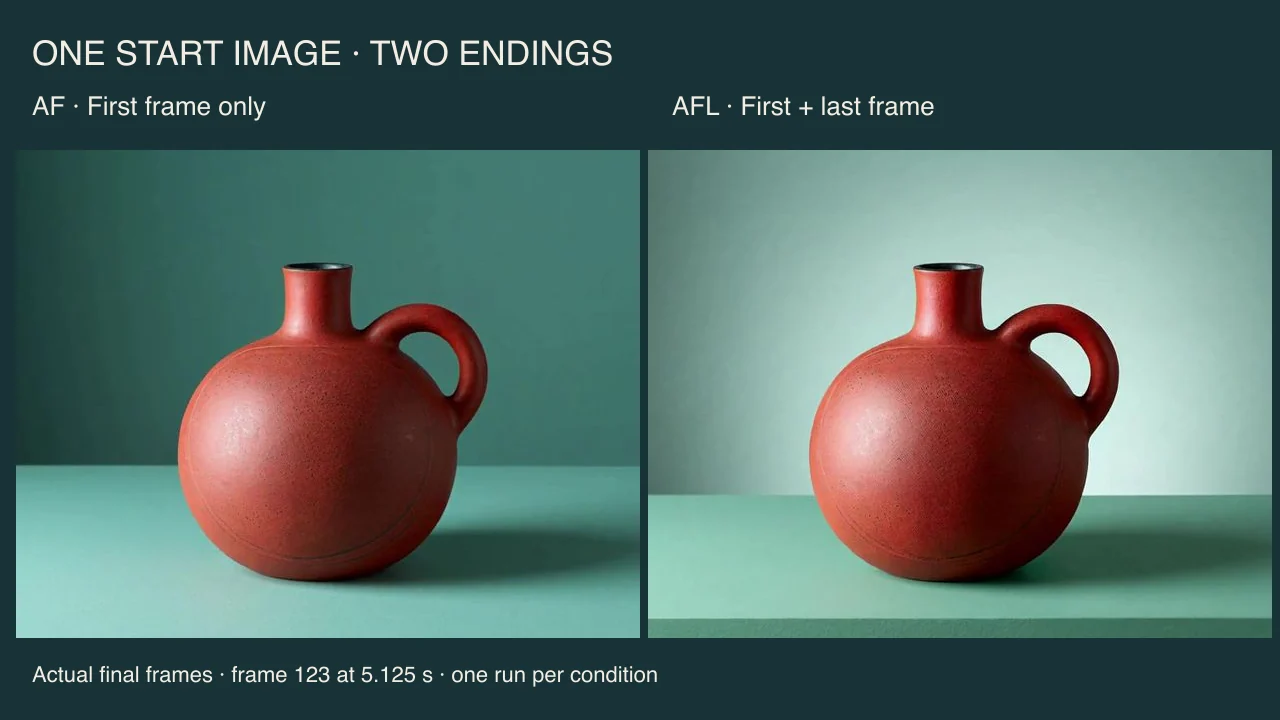
Use a start frame when you have the opening picture and want the prompt to describe what happens next. Add an end frame when you also have a particular closing composition to work toward. In our two ceramic-jug samples, both clips changed the gray setting to teal-green. The clip given an end image finished with the brighter wall and visible tabletop edge found in that image; the first-frame-only clip ended with a darker wall and a flatter-looking tabletop.
That is a useful difference to inspect before spending credits on your own product video. It is one output per setup, not a measured success rate or a promise that the final frame will copy your image exactly.
Trying to loop a clip? Compare a start frame alone with the same image in both frame slots. In two separate test clips, the same-image setup came back closer to its opening frame and changed less near the end.
1. Is an end frame the same as a reference image?
The job you give the image matters more than simply calling it a “reference.”
| What you want | Image’s job | This website’s route |
|---|---|---|
| Animate an existing picture | Establish the opening image | Image to Video → Start Frame |
| Move toward an approved ending | Guide the closing composition | Add End Frame in the same mode |
| Borrow a character, logo or visual style without prescribing a frame | Supply visual information for a reference-based video workflow | This generator has no separate subject/reference-image slot. Do not use End Frame as a substitute. |
| Change the background or another element in a still | Produce a new still image | MiniMax H3 Image → Edit Image |
A user asking how to combine a starting photo with a logo reference is asking a different question from “what should my final frame look like?” That August 16, 2026 post concerns video generation, and community replies describe other workflows. It does not establish a reference slot in this website’s generator.
Here, H3 Image supplies the stills; MiniMax H3 in the video generator produces the clip. Downloading a still and uploading it to the video workspace is the handoff between those tasks.
MiniMax’s full-reference guide distinguishes guidance from reusable content, such as a character or style, from an image serving as a concrete frame anchor. The official create-video API currently forbids mixing its reference_* roles with first_frame or last_frame in one request; that is a rule for that API, not every workflow.
If the person should already be present in your opening scene, you can compose the character into a still first, then animate that opening image. That example uses this site’s ordinary start-frame route, not a separate reference-to-video slot. It does not solve a task where the person must be referenced without appearing in the first frame.
If your reference shows the same character from several angles, compare a whole three-view sheet and a single front view as video start frames. The two opening images keep the front figure at the same size and position.
2. Download the two images and decide what must stay consistent
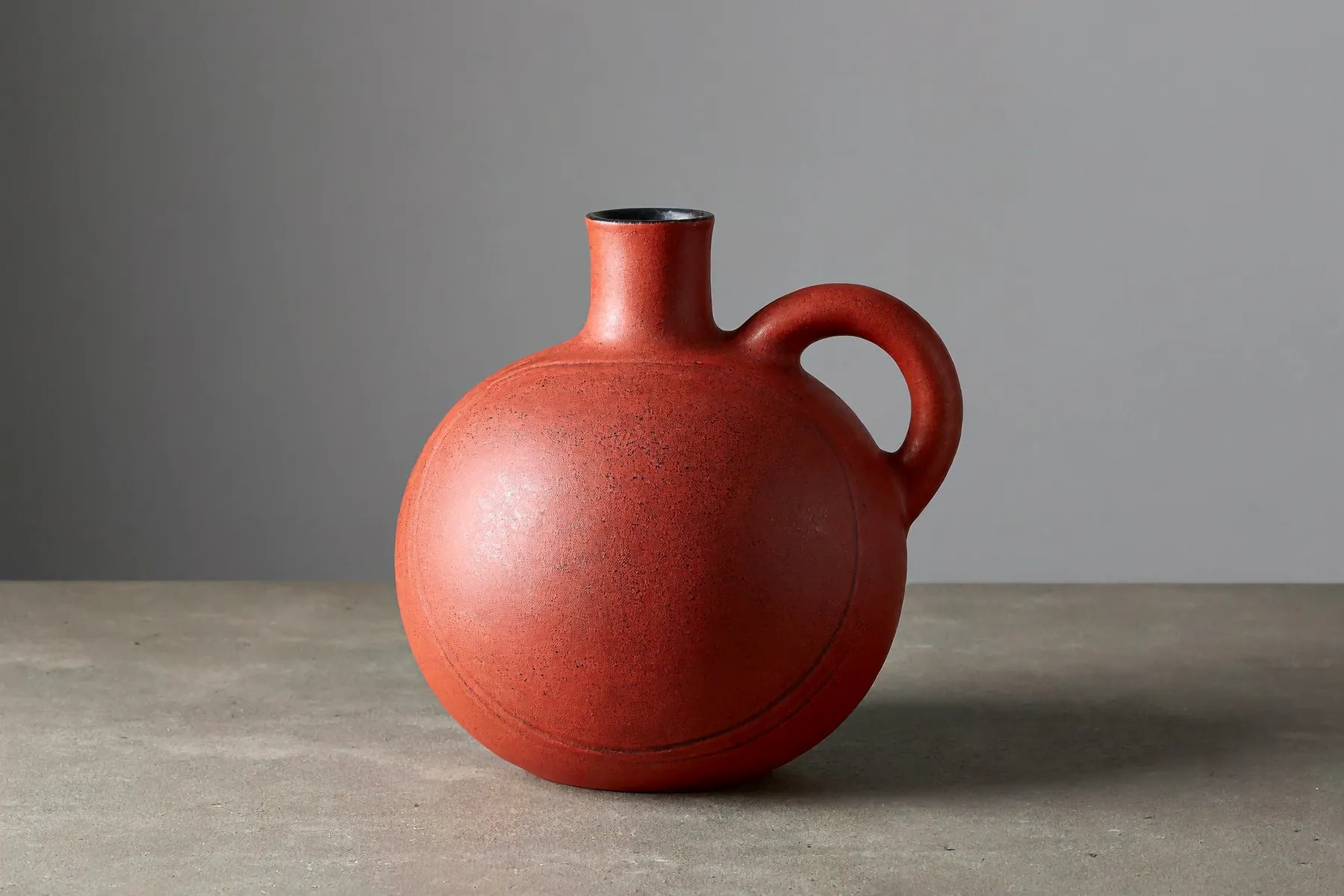
Download the gray start-frame PNG.
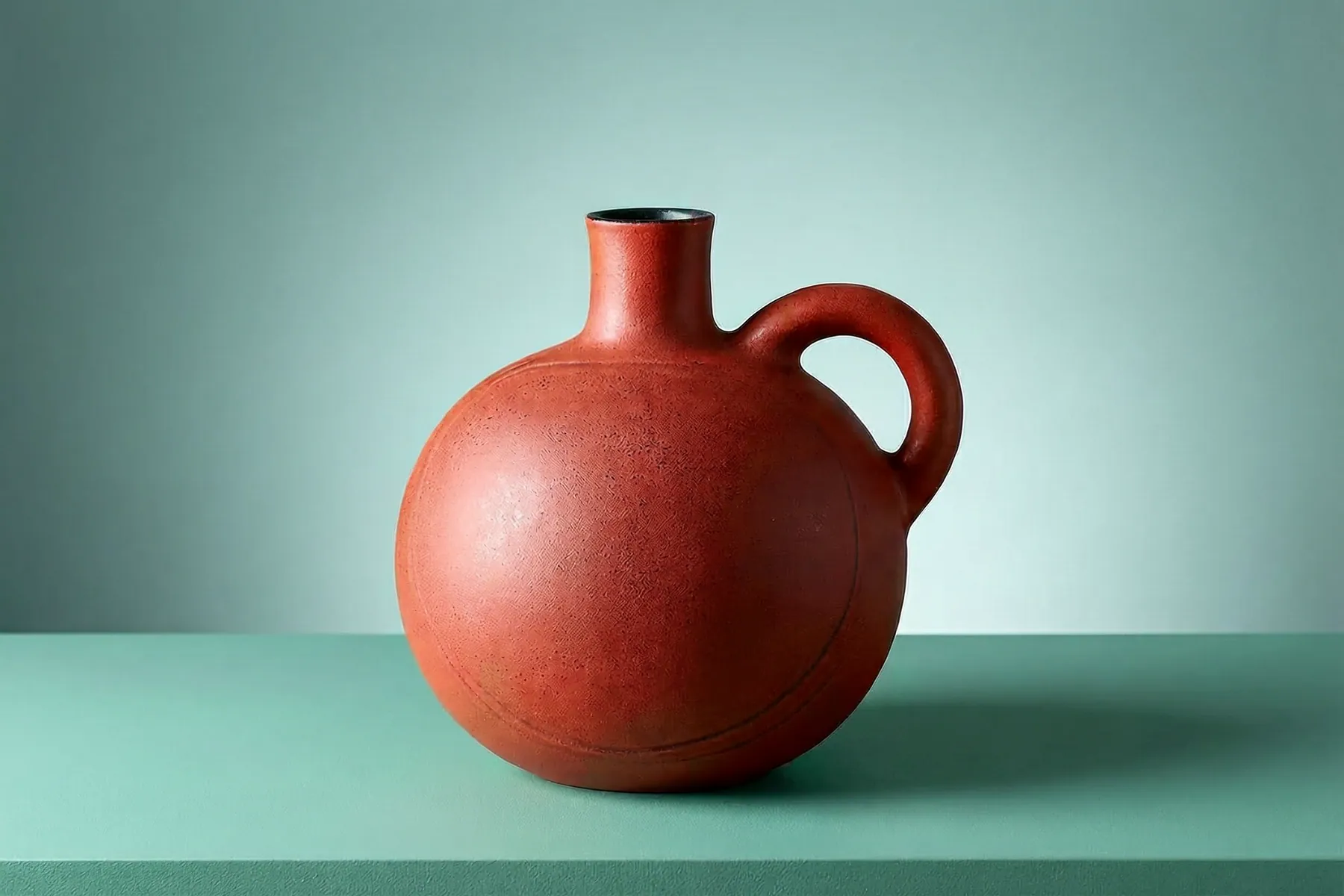
Download the teal end-frame PNG.
These are our existing AI-generated ceramic images, each 2496 × 1664 pixels, a 3:2 landscape canvas. The second came from an image edit. It changes the wall and tabletop, but also the jug’s texture and shading and the tabletop boundary. This pair is therefore not a pixel-level “background only” edit.
To prepare your own pair, use the ceramic background-editing tutorial or open the H3 Image workspace, choose Edit Image, upload the source as Picture 1, and state both the change and what should remain. Review the resulting still before making it a video endpoint: a changed handle or shadow can become part of the ending you ask the video to reach. Check the image-edit quote separately from the video quote.
3. Use one motion prompt for both video requests
We wanted a quiet product shot: keep the jug in place while the neutral setting becomes teal-green. Both requests used this complete prompt:
A locked-off static camera shows the same red-orange ceramic jug in the same position, scale and orientation throughout one continuous five-second shot. Preserve the jug silhouette, handle, mouth, glaze texture and soft lighting. The neutral gray wall and tabletop gradually change to a muted teal-green background and tabletop. End on the teal-green setting. No camera movement, no zoom, no reframing, no cropping, no cuts, no added objects, no text.| Setting | First frame only | First and last frame |
|---|---|---|
| Start image | Gray ceramic PNG | Same gray ceramic PNG |
| End image | Empty | Teal ceramic PNG |
| Model / profile | MiniMax H3 / 480P | Same |
| Requested duration / aspect ratio | 5 seconds / 4:3 | Same |
| Recorded seed | 2026111401 | Same |
| Requests made | One, no rerun | One, no rerun |
The seed records how these samples were made; it is not a requirement to find a seed control in the public form. The November 14, 2026 comparison ran in an isolated model test setup through the site’s video workflow builder. It did not measure a customer checkout, production credit debit or website waiting time.
Prepare the crop before judging the result. Our 3:2 source images were center-cropped by the workflow’s resize step to fit the selected output. The actual clips are 736 × 576, which is not an exact 4:3 pixel ratio. Writing “no cropping” in the prompt cannot cancel that preprocessing. Keep important details away from the sides and check the delivered file rather than relying only on the preset label.
A portrait source does not by itself show which frame reaches the video model: our portrait preparation check found different preprocessed frames under this test’s 9:16 and default 16:9 presets. That section separates page behavior, preprocessed inputs, and six sampled frames from each clip; the default landscape result lacks the head and boots in all six samples, without establishing every frame’s behavior.
4. Compare the opening, middle and final frame
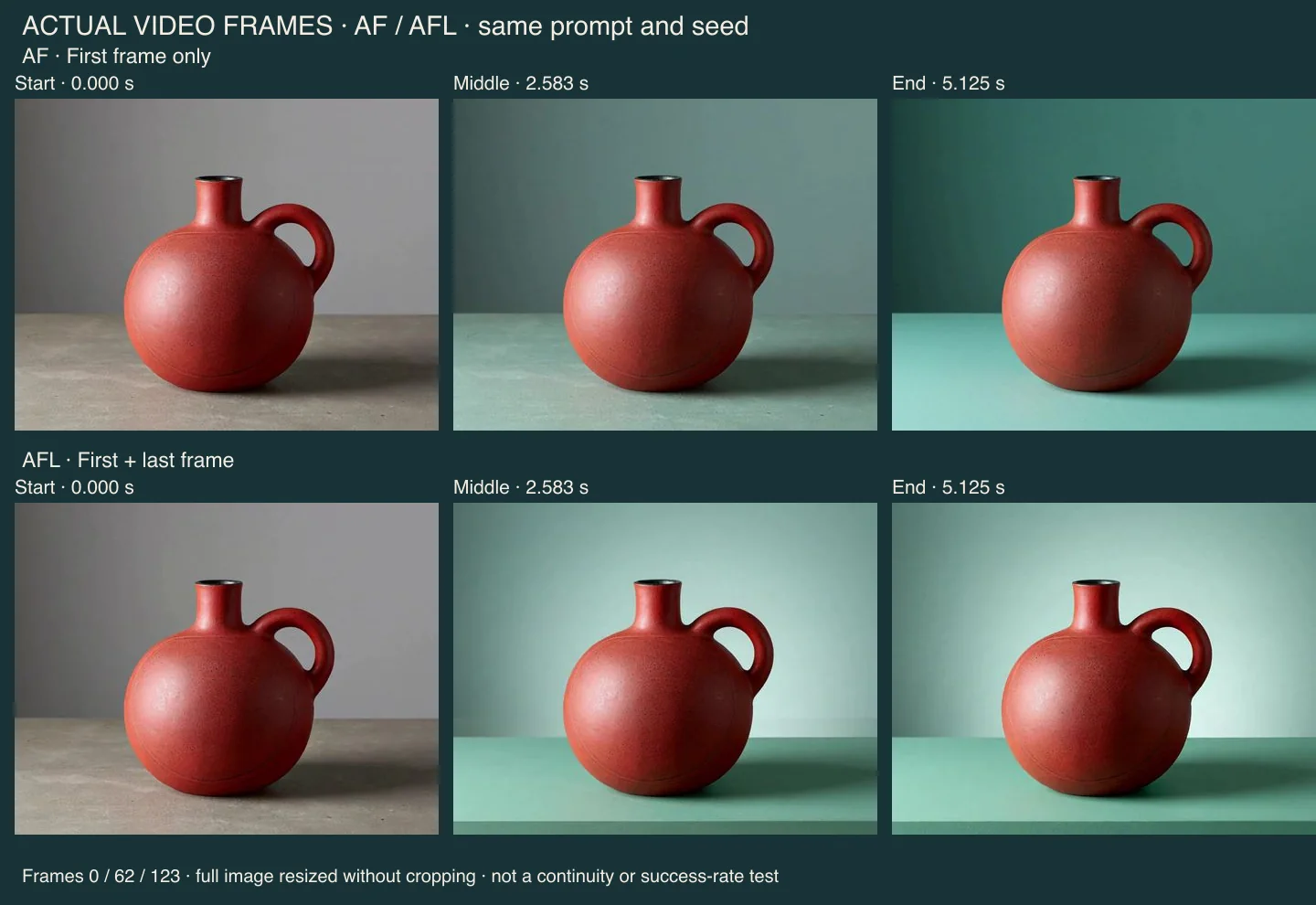
Extracted frames 0, 62 and 123, at 0.000, 2.583 and 5.125 seconds. Each row is one generation. The comparison layout and cover use actual extracted frames; they do not add a transition to either video.
| What to inspect | First frame only | First and last frame |
|---|---|---|
| Opening | Gray setting and the complete jug | Gray setting and the complete jug |
| Middle sample | Wall is becoming teal; tabletop still looks relatively gray | Brighter teal setting and tabletop edge are already visible |
| Final sample | Teal wall and tabletop; darker, more uniform wall | Brighter wall with a pale light gradient; distinct tabletop front edge |
| Product | Body, open neck and right-side handle remain recognizable in the sampled frames | The same features remain recognizable; surface detail is not pixel-identical |
The end-image version more visibly follows that image’s lighting and table boundary. The first-frame-only version also follows the prompt’s background change, so these samples do not show that an end frame is necessary to change the background. Nor do they establish how often either setup will preserve a particular product.
Watch the full files before choosing a result:
- First frame only: watch or download the original MP4.
- First and last frame: watch or download the original MP4.
Both files fully decoded and contain 124 frames at 24 fps, with a video duration of about 5.167 seconds. Their last frame starts at 5.125 seconds; that is different from the end of the file. A five-second menu choice is a request setting, not a substitute for checking the downloaded duration.
5. Does the ending freeze?
A final image close to the target does not tell you whether the preceding motion feels natural. A user reported a frozen ending when using the same picture at both ends of a loop on August 5, 2026. Our pair uses different images and asks for a static camera, so it does not reproduce that loop test.
We checked every decoded frame in the last second of these two clips. Each had 24 distinct frames, with no exactly identical neighboring pair. However, the differences were small: compression, texture or lighting changes can make pixels differ even when a shot appears still. This establishes only that neighboring decoded frames differ; it does not prove visible motion, smoothness or the absence of an apparent pause.
Watch the last second at normal speed, then compare it with the middle. For this quiet product shot, a settling background may be acceptable. For a moving subject or a seamless loop, inspect whether the action stops abruptly and whether the end-to-start join works. The three-frame comparison alone cannot answer those questions or assess the audio.
6. Try the setup with the current quote
Load the gray PNG as the start frame. This opens MiniMax H3 in Image to Video mode and fetches the original 4.9 MB PNG for the preview. You can remove or replace it before submitting.

Open Image to Video, choose MiniMax H3, and upload the gray PNG under Start Frame. Set 480P / 4:3 / 5 seconds, paste the prompt and inspect the total before actively submitting. To compare the two setups, make the first request with End Frame empty; for the second, keep the settings and prompt and add the teal PNG as End Frame.
Treat them as two separately quoted video requests. Sign-in and enough available credits are required, and the current displayed total takes precedence over any older article. Opening the generator does not upload these images or generate automatically. If you also make a new still, its image-edit cost is separate; review the current plans for purchasing credits.
Choose a start frame alone when the prompt can define the destination. Add an end frame when you have a visual destination worth inspecting against. If your main need is a cut between two views, the two-shot tutorial tests that separate timing question. minimaxh3.info is an independent service, not MiniMax’s official website.
7. Can a single portrait say a requested line?
In a separate single-start-frame run on November 15, 2026, offline automatic transcription identified the six requested words: “The green door opens at noon.” That is a transcription result, not human confirmation of perfect speech or precise lip sync. Play the clip with sound and compare the mouth and face yourself.
We used the complete 2048 × 2048 synthetic adult lipstick-edit result from the lipstick comparison. The changes made in that image edit are part of the input frame. Settings were MiniMax H3 / Image to Video / one Start Frame / no End Frame / 480P / 1:1 / 5 seconds, seed 2026111504, one accepted request with no rerun. The square source was resized by Lanczos to 640 × 640 without removing source area.
This isolated workflow used a Cobijada H3 Hybrid community checkpoint with a DMAD 4-step LoRA. Weight-file hashes were unavailable; this is not an evaluation of the official hosted API or unmodified official weights. The ordinary prompt drove the joint video/audio path, with no separate voice-reference input or audio switch. This was the complete 472-character video prompt:
Locked-off camera, one continuous close-up shot of the same fictional adult woman. She looks into the camera and clearly says exactly once in a natural English voice: "The green door opens at noon." Her lips and jaw move while speaking, then she closes her mouth and holds still. Keep the same berry-red lipstick, face, earrings, white shirt and plain background. No camera movement, no zoom, no cuts, no added objects or text, no music, no voiceover, and no other speech.Open or download the same native MP4: 640 × 640, H.264, 124 frames at 24 fps, about 5.167 seconds, with 32 kHz stereo AAC lasting 5.152 seconds. The public file is 912,599 bytes. Metadata cleaning used stream copy; compressed audio/video packets were retained without re-encoding. The player uses that small native file directly. Optional English captions were arranged by this website from the automatic transcript, with approximate timing; they are not burned into the clip or evidence that the model generated visible text.
Automatic transcript, also supplied here as readable text: “The green door opens at noon.” An offline Whisper small recognizer received audio without the target sentence, prompt or hints. Its sealed results were identical for a 16 kHz mono WAV extraction and a separate stream-copy M4A containing the original AAC. After ignoring capitalization, outer whitespace and punctuation, the requested and recognized words compare as follows:
| Position | Requested | Automatically recognized |
|---|---|---|
| 1 | The | The |
| 2 | green | green |
| 3 | door | door |
| 4 | opens | opens |
| 5 | at | at |
| 6 | noon | noon |
The native-AAC recognition segment was 0–3.88 seconds. No additional tail word was recognized, which does not establish silence or the absence of faint speech or other sounds. “Green” had the lowest model word probability, about 0.802; that score is not an accuracy rate. No human listening assessment was performed. These are two transcription inputs from the same generated clip, not two successful generations.

The strip shows frames 0, 24, 48, 72, 96 and 123, at 0, 1, 2, 3, 4 and 5.125 seconds, resized for display without facial repair. The mouth opens, rounds and closes across these samples; face and eye details also change. No new green door or clock is visible in the six frames, and the plain background remains recognizable. These observations do not establish phoneme-level synchronization, an exact final hold, or the absence of an unwanted object in every frame.
The web workspace lets you try the same inputs and settings. A new generation can produce different speech and motion. To try it, save the source PNG, open Image to Video, choose MiniMax H3, upload it as Start Frame, and leave End Frame empty. Choose 480P / 1:1 / 5 seconds, paste the prompt, and check the current quote before submitting. On November 15, both public language interfaces displayed 10 credits for those video settings; any still-image work is quoted separately. The seed identifies this isolated request, not a seed control demonstrated in the browser. This one model-level run does not validate production login, upload or credit deductions, or establish repeat script accuracy, real-person identity/voice preservation or general lip-sync quality.
8. How do you continue a MiniMax H3 video from its last frame?
Use the end of the previous clip as the Start Frame of a new request. In this MICA 27 example, the second clip kept the tight bottle framing and readable label in the sampled frames. The wall started slightly darker and the label slightly larger. The original last frame and the new opening frame differed visibly.
The first push-in started from a MiniMax H3 Image background edit. Its final frame (index 123, starting at 5.125 seconds) already cropped part of the cap. We exported that frame as the exact start-frame PNG. One new image-to-video request using MiniMax H3 took that image as its only input image, with End Frame empty. Both requests used 720P / 4:3 / 5 seconds. Both original videos decoded to 1120 × 832, 124 frames at 24 fps, with a video track of about 5.167 seconds each.
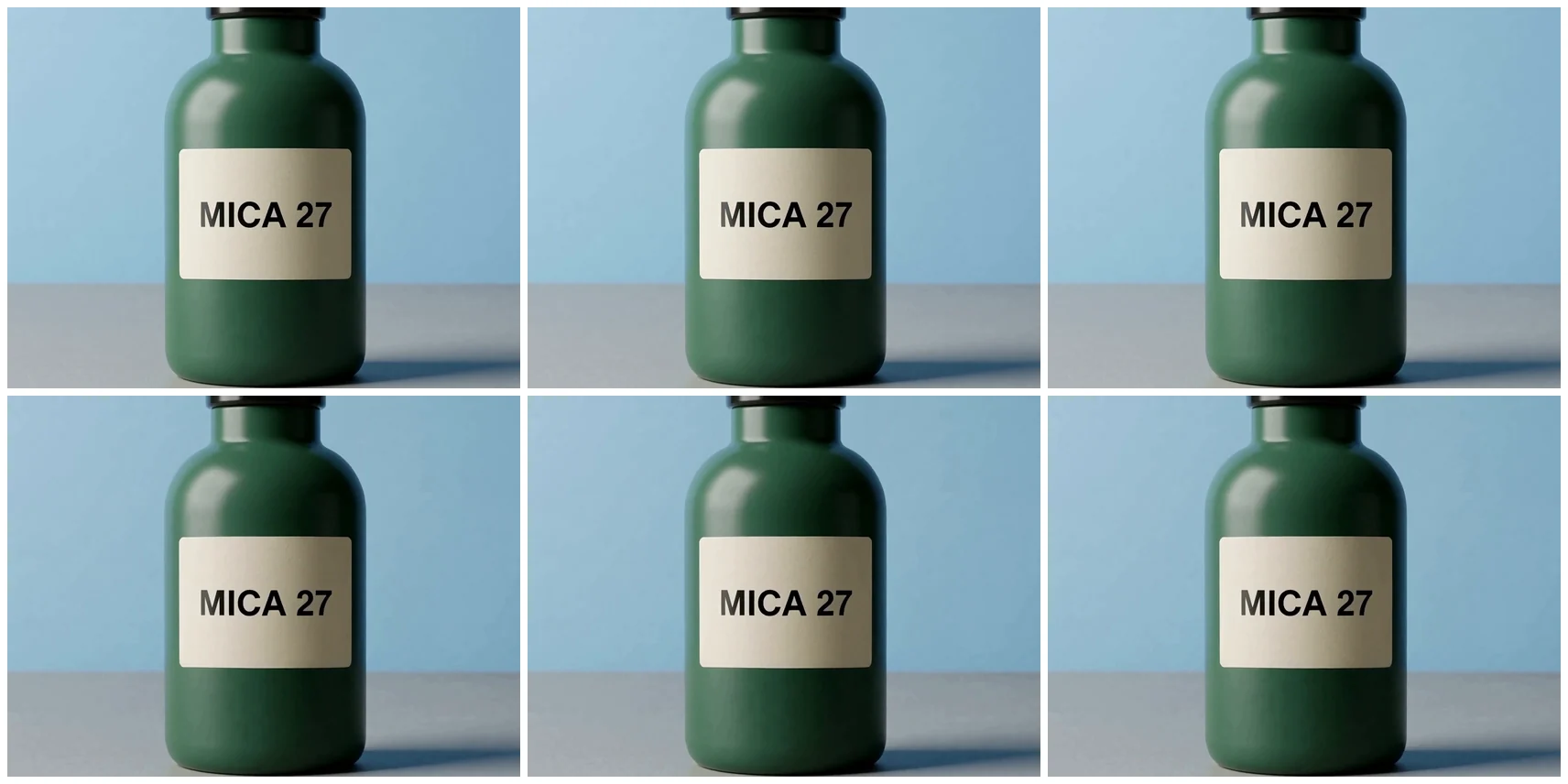
The upper row shows the first clip’s frames 121–123 (5.042–5.125 seconds). The lower row shows the second clip’s frames 0–2 (0–0.083 seconds). All six samples still show the cropped cap and a readable MICA 27.
- At the join. The mean absolute RGB difference between the first clip’s last frame and the second clip’s first frame was 6.28 out of 255 per channel value. Differences between adjacent frames in the half-second windows on either side ranged from 0.27 to 0.83 and 0.22 to 0.74, respectively. The second clip’s first decoded frame also differed from the submitted PNG. The files show the input and output pixels. The internal first-frame mechanism was unobserved.
- Early movement. The label spanned about 369 pixels across the first clip’s last 12 frames at the sampled rows. It measured 377 pixels at the next opening and 383 pixels by frame 11 (0.458 seconds). This tracks the label’s apparent width, so it shows enlargement in that part of the image. Camera speed was not measured.
This one-second silent preview combines A112–123 (4.666667–5.125000 seconds) and B0–11 (0–0.458333 seconds). It cuts directly at 0.5 seconds and uses H.264 re-encoding at 24 fps, CRF 19. The full experimental files are retained on the test server. Both originals have AAC tracks. Audio at the join was not assessed by listening.
Prompt used for the new clip
Start on the exact composition and view of the provided frame. Continue a single slow, straight push-in toward the same MICA 27 bottle against the same studio wall and tabletop. The bottle is stationary and upright. Begin at the existing tight crop, with part of the cap already above the top edge. Do not pull back, recenter, change the background color, or change the angle. Move a little closer while keeping the MICA 27 label in frame and readable. Keep the shape, typography and lighting of the bottle consistent. One shot, no cuts, no added objects or overlays, no speech and no music.To try it, export the last visible frame of your clip as a PNG in a video editor, or save the exact sample PNG above. Open Image to Video, select MiniMax H3, upload the PNG as Start Frame, and leave End Frame empty. For this setup, use 720P / 4:3 / 5 seconds and paste the prompt. Sign in and check the current quote before submitting. To join the clips, place both on your editor’s timeline and inspect the cut at normal speed with sound. The new request gets one opening image. The previous clip’s motion and audio tracks stay out of the input.
MiniMax’s full-reference guide describes continuation from a whole source video. Its Create Video Generation Task API lists reference_video under reference-to-video mode. That mode and the one that accepts first_frame or last_frame are mutually exclusive in one request.
9. Can the same start and end image make a MiniMax H3 video loop?
In this pair, the same-image clip ended closer to its opening frame and changed less in its final second. Both clips fell short of our preset low-change criterion. These pixel measurements cannot tell you whether the loop looks seamless or whether a viewer notices a pause.
On November 19, we ran MiniMax H3 once per setup in an isolated test environment, using the same ceramic-jug PNG with the teal background, prompt and single seed (2026111907). Both requests used 480P / 4:3 / 5 seconds and their respective start-only and start-and-end workflows. Both decoded to 736 × 576 at 24 fps, with 124 frames and a video track of about 5.167 seconds.
- A · Start Frame only. The difference between the clip’s last and first decoded frames was 10.81. The median difference between adjacent frames in its final second was 1.17.
- B · Same image in Start Frame and End Frame. The last-to-first difference was 1.84. The median adjacent-frame difference in its final second was 0.30.
Both measures use mean absolute differences across RGB channel values on a 0–255 scale. Before running the test, we defined a low-change interval as at least six consecutive adjacent-frame pairs at or below 0.35 in the final second. A had zero pairs at or below 0.35. B’s longest run had three pairs, so neither met the criterion. The two clips used different workflow branches. This test does not isolate the effect of adding an end image or measure repeatability. The original audio at the loop point was not assessed.
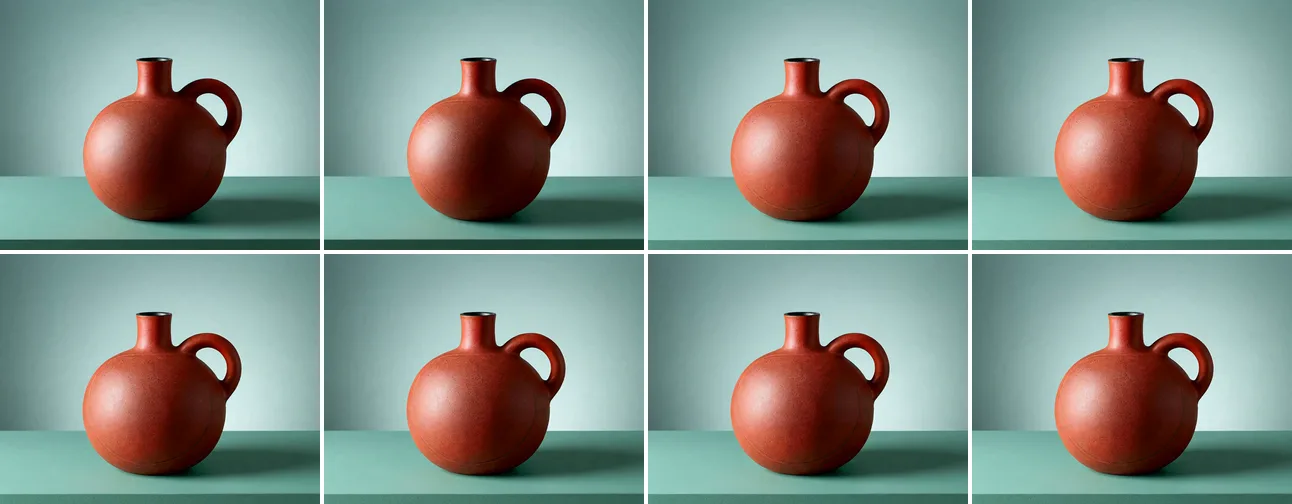
In each row, read left to right: frames 122, 123, 0, 1. Frame 123 starts at 5.125 seconds; the loop cut is between the second and third columns.
Play or replay the one-second silent comparison. A is on the left, B on the right. Each side shows the last 12 frames and then the first 12 frames of its own clip, with a direct cut at 0.5 seconds.
Prompt used for both clips
Locked-off camera on the same red ceramic jug. The jug stays still against the teal wall. A soft moving reflection travels across the front from left to right, then back toward its starting position on the left by the end, with gentle continuous movement. Keep the wall, tabletop, framing, handle and jug unchanged. One shot, no zoom, no cuts, no text and no extra objects.To try either setup, download the ceramic-jug PNG with the teal background, open Image to Video, and choose MiniMax H3. Upload the PNG manually as Start Frame. For A, leave End Frame empty. For B, upload the same PNG again as End Frame. Choose 480P / 4:3 / 5 seconds, paste the prompt, sign in and check the current quote before submitting. The seed identifies these isolated runs. The web steps reproduce the visible inputs and settings, and a new result can differ.