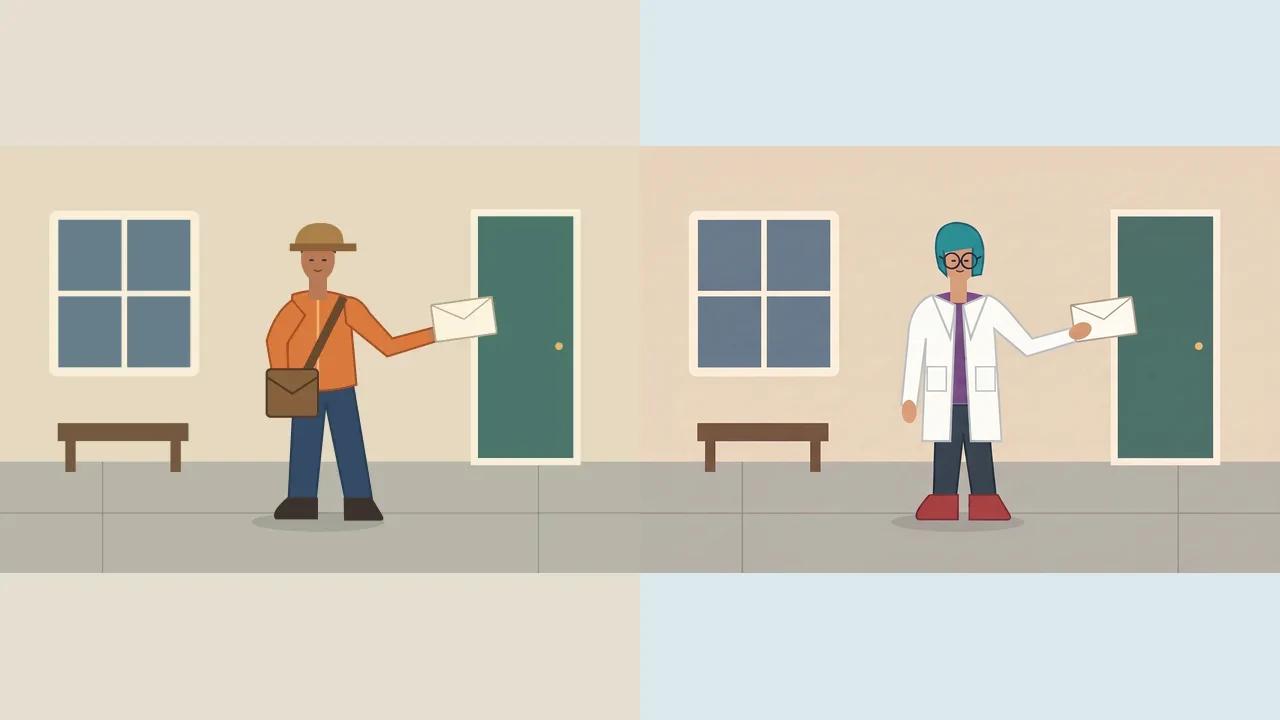
In one two-reference MiniMax H3 Image edit, a teal-haired scientist replaced the courier and kept the arm extending toward screen-right with an envelope. The full pose did not stay: the other arm dropped to the side and the legs drew closer to the new character’s neutral stance. Getting the requested appearance did not mean preserving every part of the original pose.
This November 15, 2026 test used two newly drawn illustrations of fictional adults, one reference for the scene and pose and another for appearance and clothing. It was one isolated model request, with no rerun or manual repair, outside the production website’s upload, login and credit flow. minimaxh3.info is an independent service, not MiniMax’s official website. The cover shows the complete scene input on the left and the complete output on the right, reduced to fit.
1. Give the two references different jobs
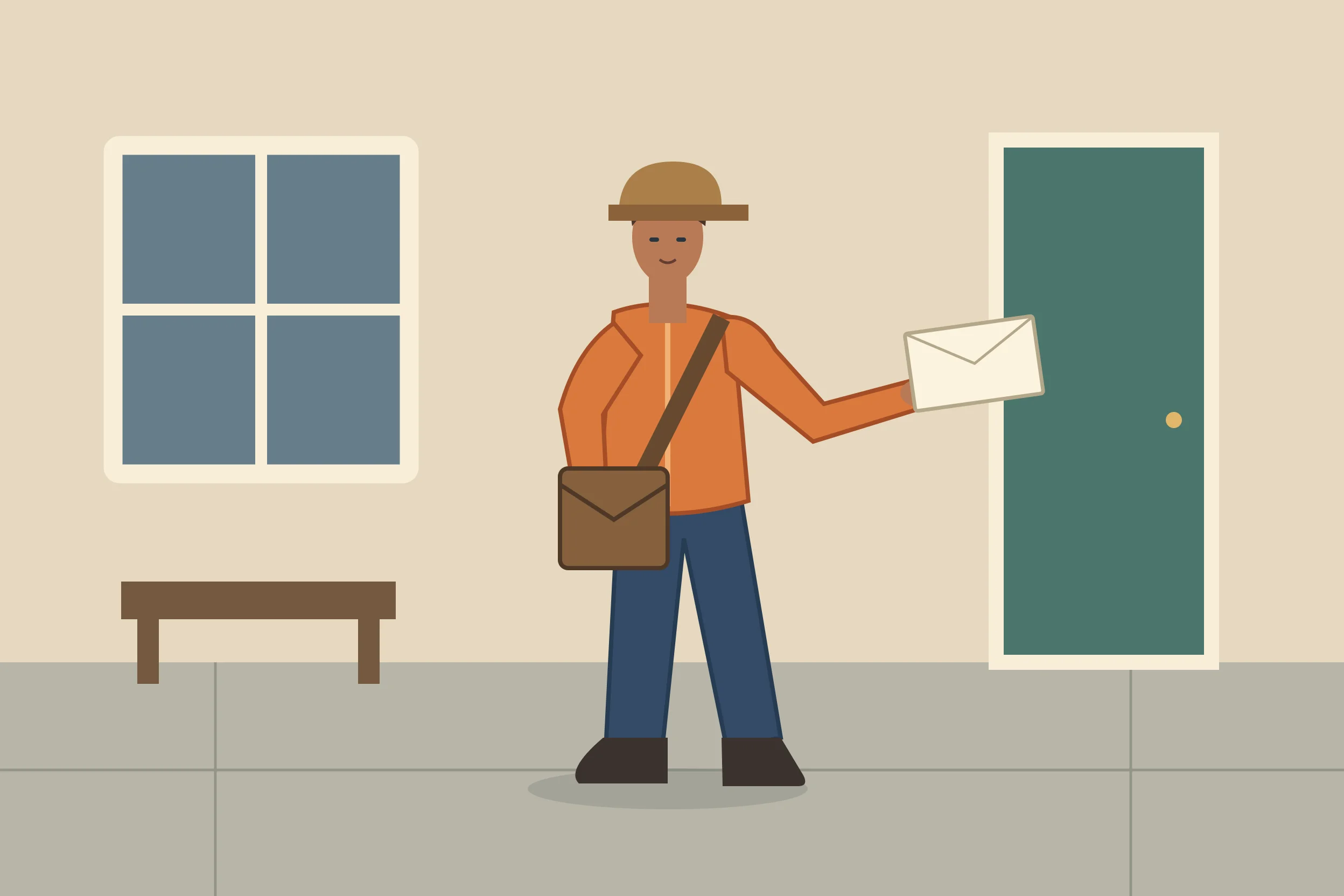
Picture 1 owns the scene and pose. It has a window on the left, a bench below it, a green door on the right and pavement under the courier. One arm bends toward screen-right to hold the envelope. The other arm is bent near the bag, and the legs have a wider stance than in Picture 2.
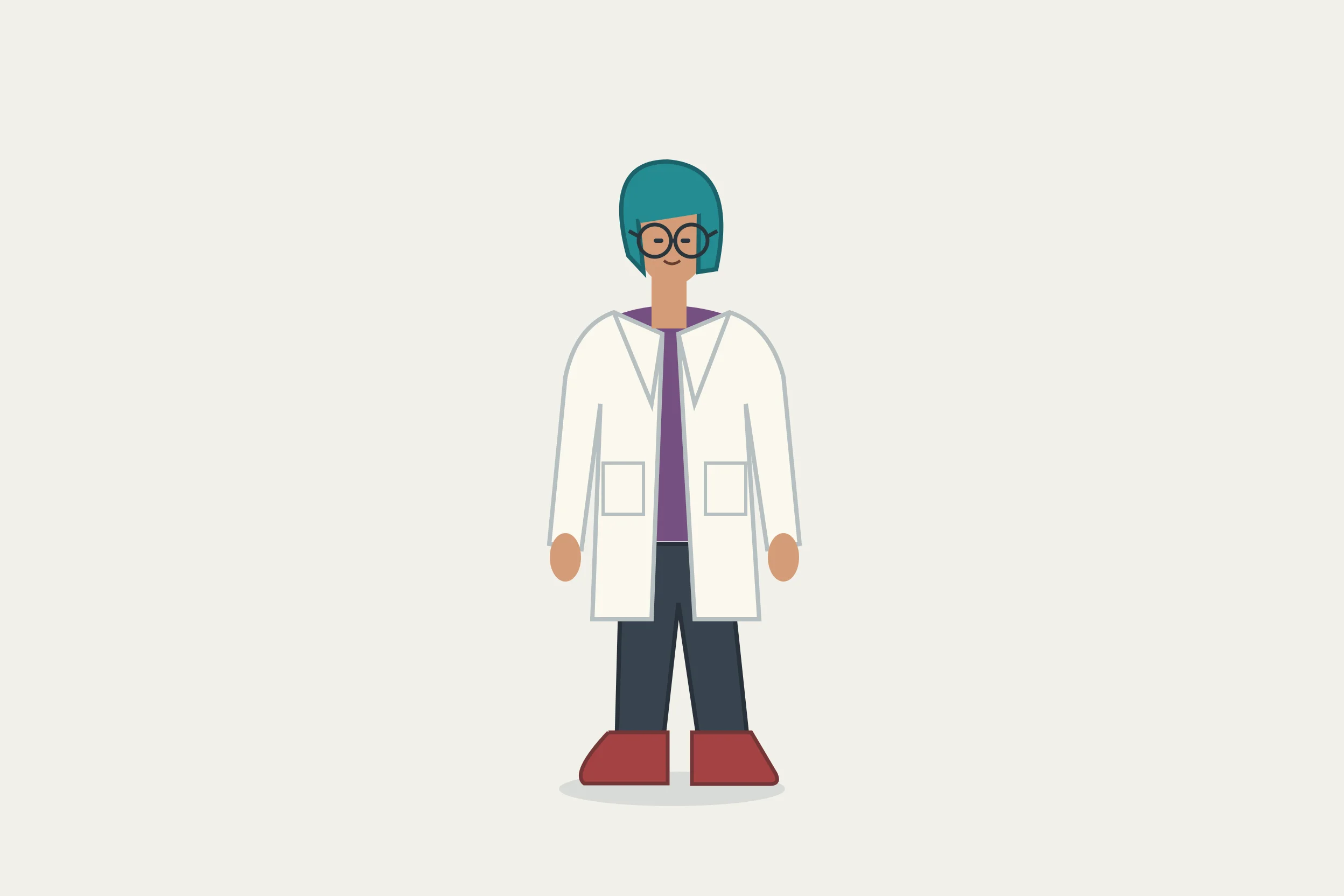
Picture 2 owns the replacement appearance and clothes. Its plain background and arms-down pose are not requested in the final scene. It is a single full-body character reference, not a multi-view character sheet.
Both images were created from original SVG geometry and rasterized, then converted to 2496 × 1664 WebPs. The images above are the exact model inputs. Download Picture 1, scene and pose and Picture 2, character appearance to follow this order.
| Reference | Borrow | Do not borrow |
|---|---|---|
| Picture 1 | Full-body placement, leg stance, bent arm, envelope and street layout | Courier hat, orange jacket, brown bag and strap |
| Picture 2 | Teal bob hair, round glasses, white coat, purple shirt, dark trousers and red boots | Arms-down pose and plain background |
This request replaces both the character appearance and clothing. Keeping the original orange outfit would be a different task requiring a different brief.
2. Submit a brief that separates appearance from pose
In the MiniMax H3 Image workspace, choose Edit Image. Upload the street scene as Picture 1, then the scientist as Picture 2. Check the displayed order. Choose 3:2 and one output, review the current credit total and submit when you want to run the edit. This tutorial does not automatically load or submit the files.
Complete prompt used in the recorded request:
Replace the courier in <Picture 1> with the adult scientist from <Picture 2>. Use Picture 2 for teal bob hair, round black glasses, white knee-length lab coat, purple shirt, dark trousers and red boots. Use Picture 1 for the full-body position, leg stance and bent arm extending toward screen-right, holding the same blank envelope. Keep the window, bench, green door, pavement and framing from Picture 1. Remove the courier cap, orange jacket, brown shoulder bag and strap. Do not copy the arms-down pose or plain background from Picture 2. Show one adult only; add no text.The six checks were recorded before generation: appearance, clothing, pose and envelope, removal of old accessories, scene preservation, and anatomy including hand-to-envelope contact. The request used two references, one output, seed 352223 and 2496 × 1664 dimensions. It returned one 2496 × 1664 PNG. The archived edit template’s SHA-256 begins 9df65ebe2c26; the service response did not provide a model-weight hash. This identifies the template for comparison across deployments, not a complete configuration for exact reproduction. The seed records this isolated run; it is not a browser control demonstrated by these steps. We did not measure production sign-in, billing or website turnaround time.
3. Inspect the whole result before calling the replacement complete
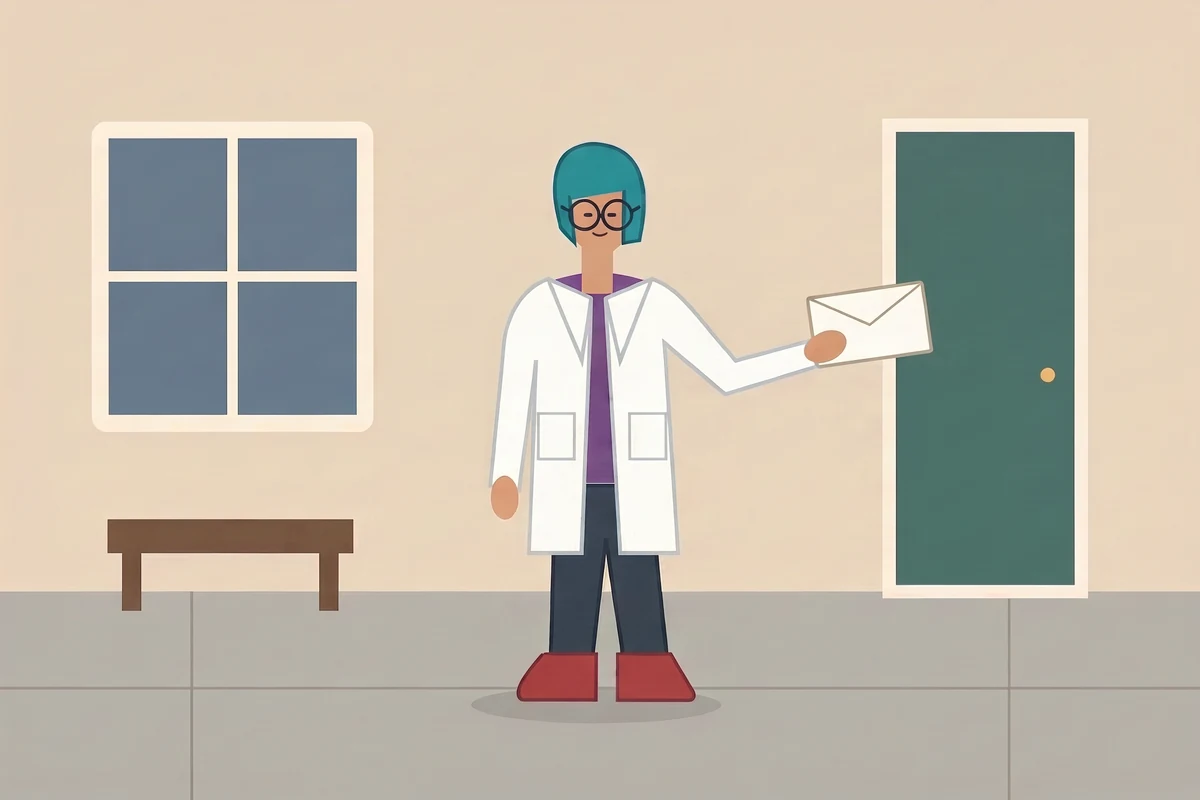
This is a compressed 1200 × 800 preview. Download the 2496 × 1664 output PNG for full-resolution inspection. Generation metadata was removed from the download; decoded image pixels were preserved. No body parts or facial features were repaired.
| Check fixed before the run | Observation in this output |
|---|---|
| Replacement appearance | Teal bob hair and round black glasses appear. The small illustrated face resembles Picture 2’s visible landmarks; this is a visual feature comparison, not measured identity or biometric similarity. |
| Clothing | The white long coat, purple shirt, dark trousers and red boots appear. The old orange jacket is gone. |
| Pose and envelope | The bent arm toward screen-right and blank envelope remain, but the other arm becomes straight and lowered. The legs and screen-right boot move toward Picture 2’s narrower neutral stance. Full-pose preservation failed. |
| Old accessories | The courier’s hat, brown shoulder bag and crossing strap are no longer visible. |
| Scene and composition | The window, bench, green door and pavement remain in broadly the same arrangement. Surfaces and shading are redrawn; this does not demonstrate pixel-for-pixel background preservation. |
| Anatomy and contact | One adult with two arms and two legs is visible. The envelope-side hand is an oval overlapping the envelope with no visible finger structure, so a natural grip cannot be verified. |
The useful result and the failed preservation requirement belong in the same assessment. If your shot depends on both arms and the original leg stance, this is not a finished pose-preserving replacement.
4. Compare pose and appearance separately
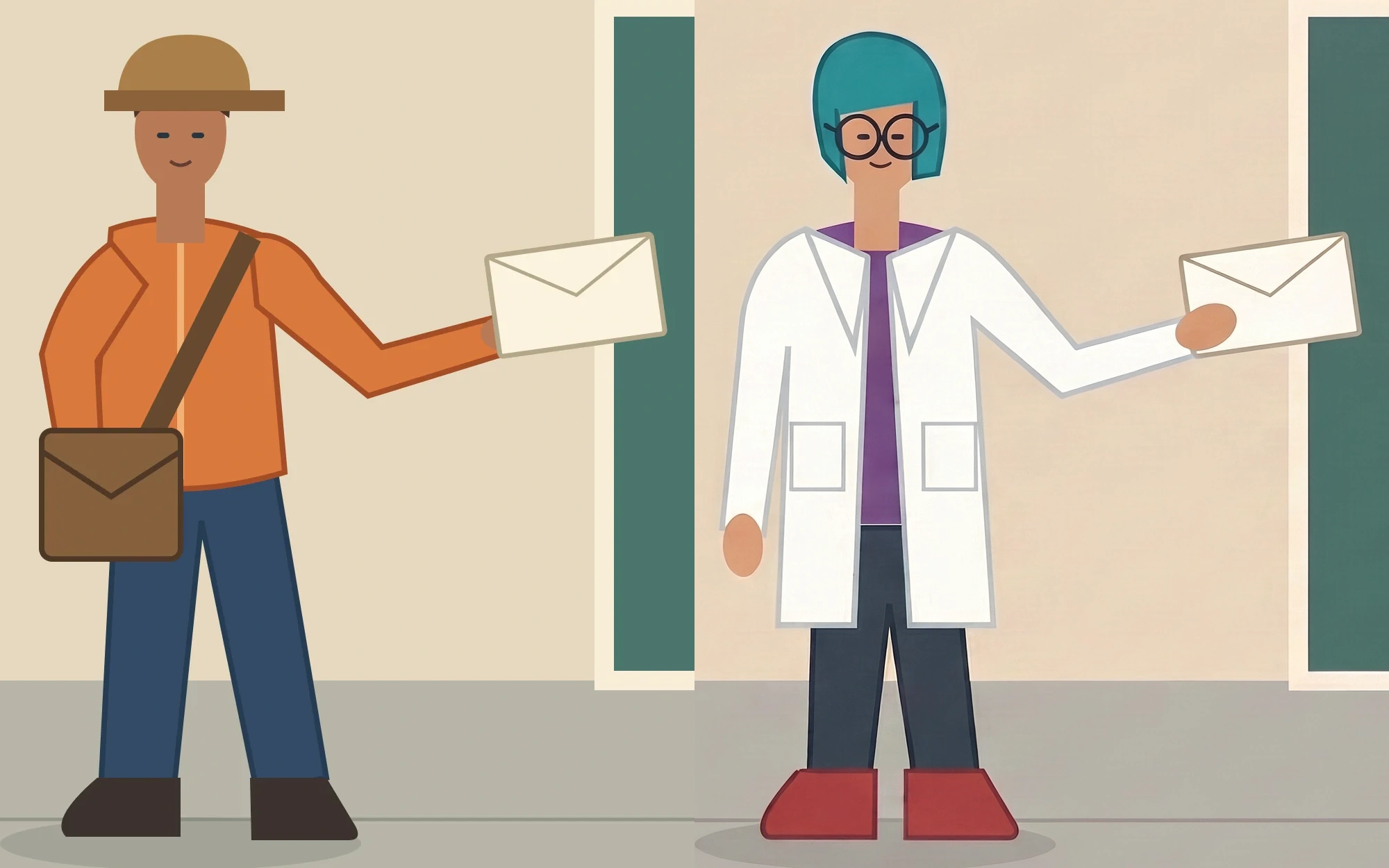
Each half is a 1000 × 1250 crop starting at x = 980, y = 250 in Picture 1 or the output. The crops were joined at the same native scale without resizing or retouching, then encoded as a 2000 × 1250 WebP. Follow the shoulders, elbows, wrists, knees and boots independently. A familiar envelope gesture can distract from the arm and stance that changed.
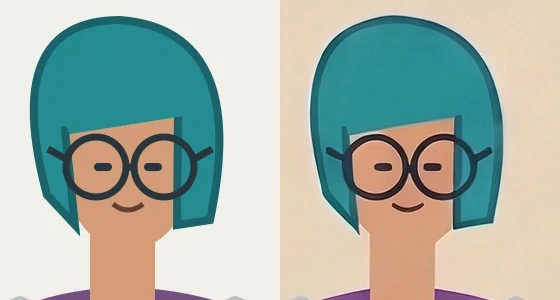
Each head crop starts at x = 1120, y = 280 and covers 280 × 300 pixels, placed side by side without resizing or repair in a 560 × 300 WebP. Hair color and silhouette, glasses and the simplified facial features can be compared here. Skin shading and line rendering differ. These original flat illustrations do not test photographic face matching or prove that the same person would stay recognizable across many scenes.
For a smaller portrait edit, the lipstick test starts from one face and compares the lips and the skin beneath an eye after a berry-red edit.
5. What question does this test answer?
A ComfyUI user’s original report describes two separate experiences: a base image plus a character-sheet replacement did not follow the requested change; another workflow followed a pose but produced a confused character reference. Those are the author’s reports about different attempts, not observations from our test. They do not establish which local node or model setting caused the behavior.
Our independent two-image test asks a narrower question: can the requested appearance enter the scene while its pose remains? Appearance and clothing transferred visibly, but pose preservation was partial. There was no prompt comparison, alternative workflow test or repeat series. We cannot attribute the result to one sentence, diagnose the Reddit user’s setup, promise a fix or estimate reliability from this sample.
The character-sheet walkthrough examines a different problem: producing front, side and back views from one reference, then checking an accessory repair that also removed a detail meant to stay. Neither example replaces a separate check of the pose and face you need in your own scene.
6. Check your own two-image edit
- Put the scene first and the replacement reference second. Name which image supplies the pose, outfit, appearance and background.
- Mark the joints and objects that must remain: both elbows, hand placement, knee spacing, boots and contact with a held object.
- Download the full result. Compare the pose to Picture 1 and the appearance to Picture 2 separately, then inspect unwanted accessories and background changes.
- Keep any failed preservation requirement in your decision. A new prompt or a different reference is a new attempt; neither has been demonstrated here as a fix.
If you need to prepare the files first, see the reference-image preparation guide. Then open the image workspace, select Edit Image and upload references you have the right to use. Confirm the current quote before submitting. A completed output with the wrong pose differs from an output marked failed by the service; check the actual status and current terms rather than assuming credits will be returned.
7. Animate the composed opening frame
If the new person should already be in the opening scene, compose that still first, inspect it, then upload it as a video Start Frame. That is different from asking a reference-based video mode to borrow a character without making the reference image the opening. MiniMax’s official full-reference guide distinguishes those roles; the start-and-end-frame walkthrough explains the routes available here. This site’s video form has no separate character-reference slot.
For one November 15 follow-up, we used the complete published replacement PNG as the only start image, with no end image. Neither original reference was separately supplied to the video model. No new still, pose correction or manual repaint was made: the changed arm and leg stance from the earlier edit remain part of the opening.
The isolated request used MiniMax H3 / Image to Video / 480P / 4:3 / 5 seconds, seed 2026111503, once with no rerun. Its complete prompt was:
Locked-off camera. The adult scientist gently raises the blank envelope a little, then holds still. Preserve teal bob hair, round black glasses, white lab coat, purple shirt, dark trousers and red boots. Keep one person, the same window, bench and green door. No camera movement, no zoom, no cuts, no added objects or text.The 2496 × 1664, 3:2 input was center-cropped before generation: the runtime resize rule retained a 2126 × 1664 region starting at x = 185, y = 0, then resized it to 736 × 576. That removes 185 source pixels from each side. The selected 4:3 preset is not an exact promise about the output’s pixel ratio; inspect side details before submitting your own image.

Decoded frames 0 / 31 / 62 / 93 / 123, shown as complete frames reduced with padding. In these samples, the envelope rises and tilts, while the teal hair, round glasses, white coat, purple shirt, dark trousers, red boots and street landmarks remain recognizable. This does not establish exact face matching, pixel-level preservation or full-clip fidelity.
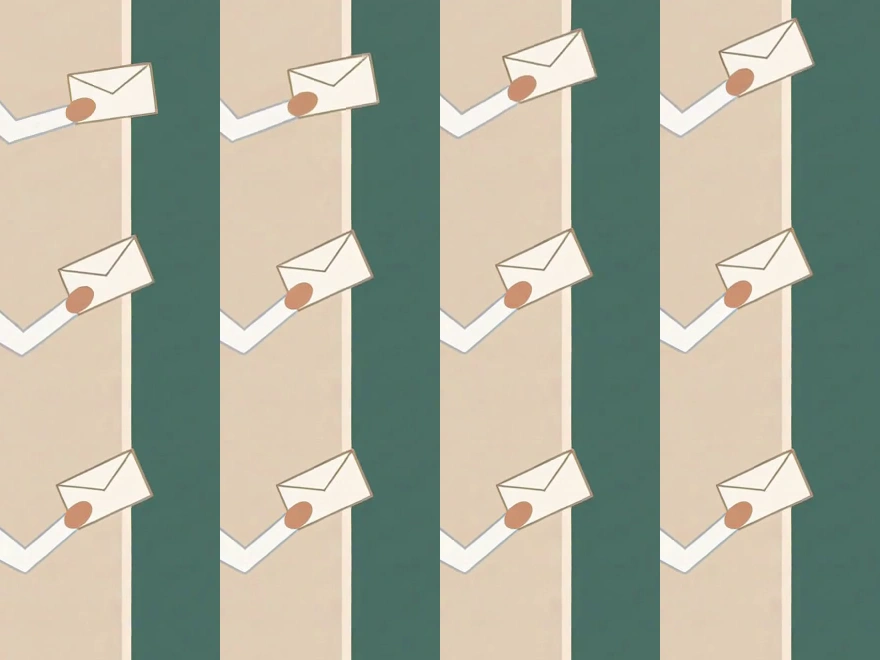
Read left to right, row by row: frames 0, 12, 24, 36 / 48, 60, 72, 84 / 96, 108, 120, 123. Each crop is x = 450, y = 140, width = 220, height = 220 in the native video frame, without resizing, repainting or sharpening. The envelope is visibly higher by about 1.5 seconds, but later samples still change slightly in angle and position: “then holds still” is not demonstrated as a complete stop. The hand remains a simplified oval without distinct fingers, so natural gripping anatomy is unresolved.
The player is a re-encoded 640 × 500 compressed preview with the actual first frame as its poster. Open the native 736 × 576 MP4: H.264, 124 frames at 24 fps, about 5.167 seconds, with an AAC stereo stream. The public file is 361,156 bytes; metadata was cleaned by stream copy, retaining the compressed audio/video data without video re-encoding. An audio stream does not establish useful sound. Watch the full clip; the frame selections alone cannot assess every moment.
To try the route, download the composed PNG, open Image to Video, upload it as Start Frame, leave End Frame empty, and select the model, ratio, duration and resolution. Check the current video quote before submitting; any preceding image edit has its own cost. This isolated test did not measure production upload, login, billing or website waiting time. It shows one composed-still handoff, not automatic transfer, a Ref2VA test or a general success rate.