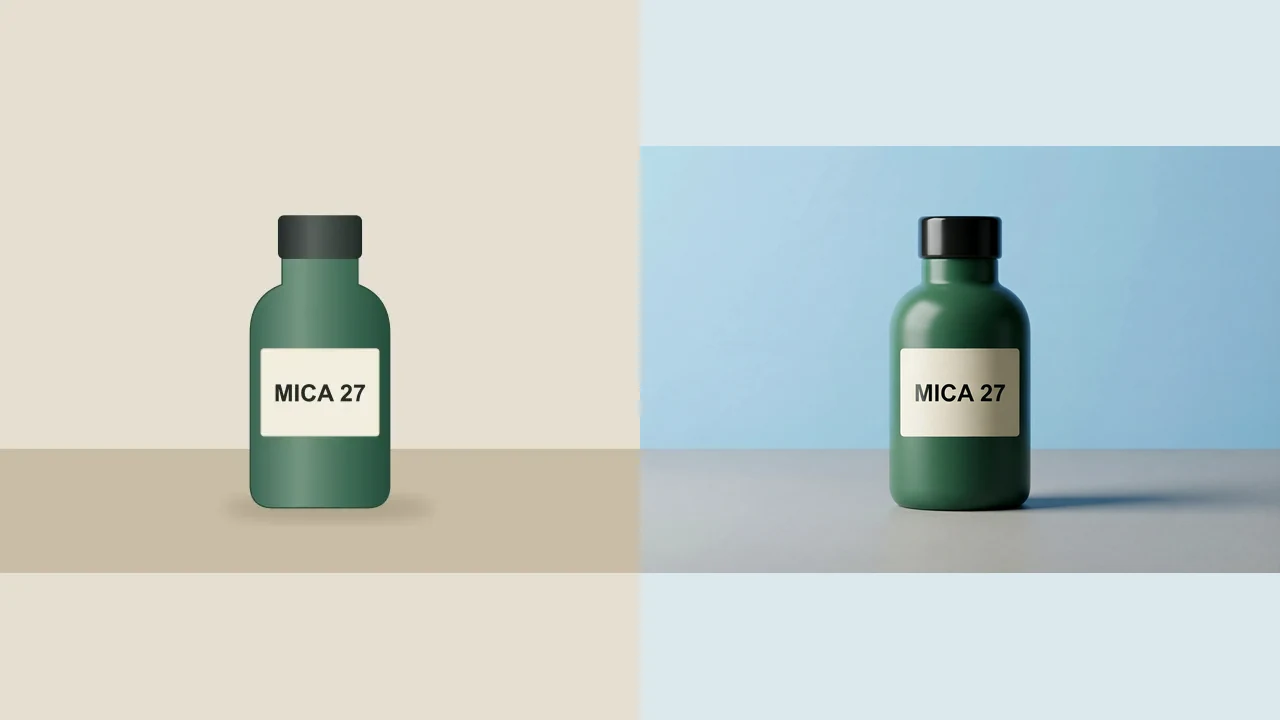
In one MiniMax H3 Image background edit, the bottle’s short label still read MICA 27, with the four letters followed by a space and the digits 2 and 7. The pale blue wall and gray tabletop appeared, but the lettering edges, label shading and bottle reflections were also redrawn. Keeping the words readable did not mean keeping the product pixels unchanged.
This is a single isolated model run from November 15, 2026, using an original geometric bottle illustration. It is not a photograph of a real product, a small-print packaging test, or an order through the production website’s login and credit flow. minimaxh3.info is an independent service, not MiniMax’s official website. The cover places the complete input on the left and the complete output on the right; it is a reduced comparison, not a separate generated sample.
1. Start with a label you can check character by character
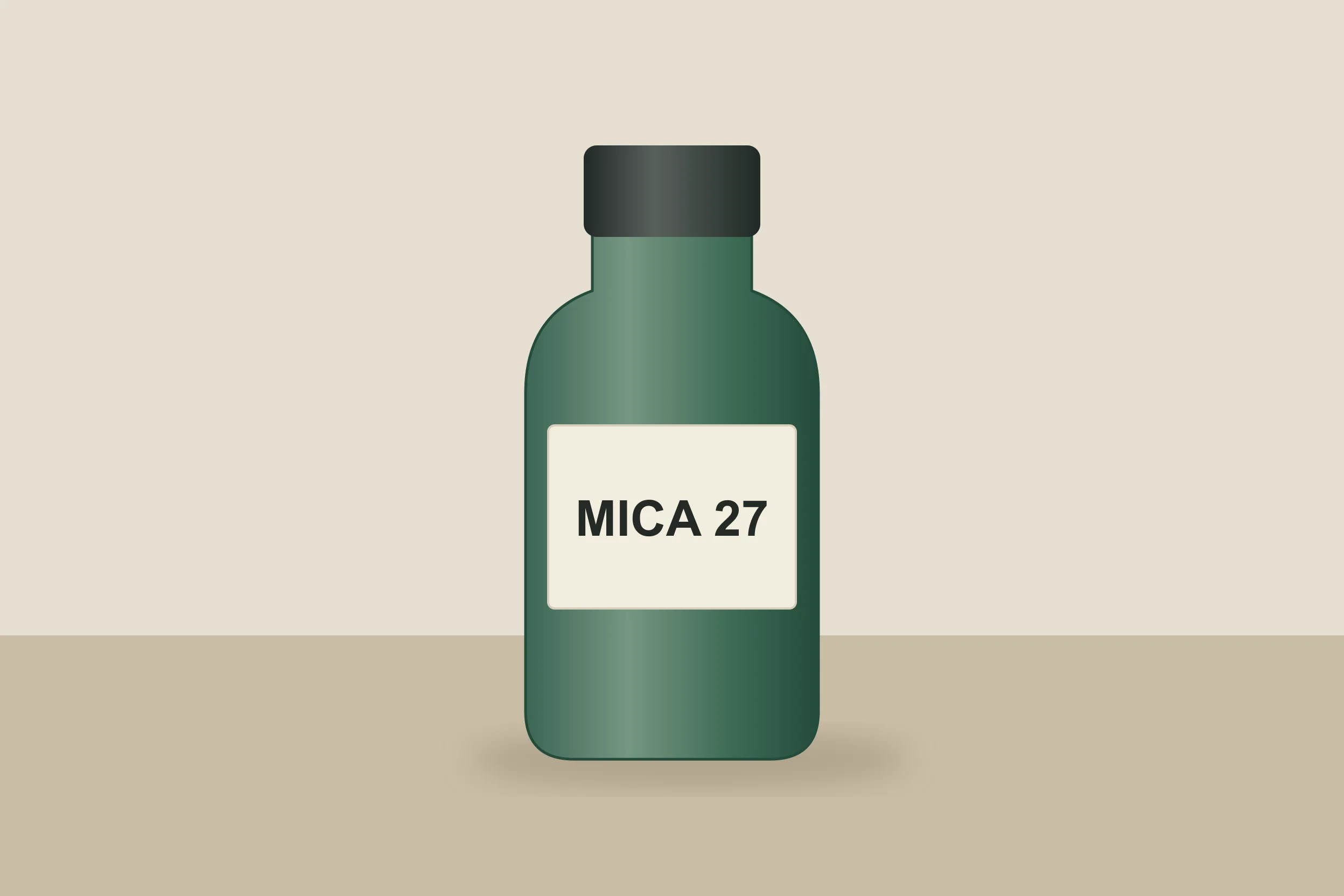
The source was drawn with original vector geometry and rasterized to 2496 × 1664 pixels. Its only text is the large, clear MICA 27 label. The actual model reference is the WebP shown above, converted from that source. Download the exact uploaded reference if you want to try the same input.
Before editing, identify what each check means:
| Check | What the input gives you |
|---|---|
| Wording | M, I, C, A, then a visible space, then 2 and 7 |
| Label | One cream rectangle with rounded corners on the bottle front |
| Product | One green bottle, dark cap, rounded shoulders and a visible full base |
| Requested change | Replace the beige wall and tabletop with a pale blue wall and light gray tabletop |
The earlier product-background tutorial used an unlabeled ceramic jug. That example can show surface and lighting changes, but it cannot answer whether letters survive an edit. This bottle adds that specific check without claiming to represent a real brand or all packaging designs.
2. State the background change and the exact text to preserve
Open the MiniMax H3 Image workspace, choose Edit Image, and upload the reference as Picture 1. For this example, choose 3:2 and one output. Review the current credit total and submit only when you want to run the edit; this article does not load or submit the image for you.
Complete prompt used in the recorded request:
Replace only the background and tabletop around the supplied bottle in <Picture 1> with a pale blue studio wall and a matte light gray tabletop. Preserve the entire single green bottle, cap, shape, position, perspective, cream rectangular label, and the exact label text MICA 27 with identical spelling, spacing and digit order. Do not add, remove, repeat or change any letters or digits. Keep the label on the bottle. Keep one bottle only. Add no other objects or text.The wording separates the permitted background change from the requested product and text preservation. It also spells out the digits and spacing to inspect afterward. These are instructions to test, not guarantees that the model will preserve every detail.
The recorded run used one reference, one requested output, seed 352217, and requested dimensions 2496 × 1664. It returned one PNG at those dimensions. We made one request and did not rerun or repair the lettering. This direct model test did not measure production upload, sign-in, credits or website turnaround time. The seed is a record of this test, not a control demonstrated in the browser workspace.
3. Compare the words before judging the new scene
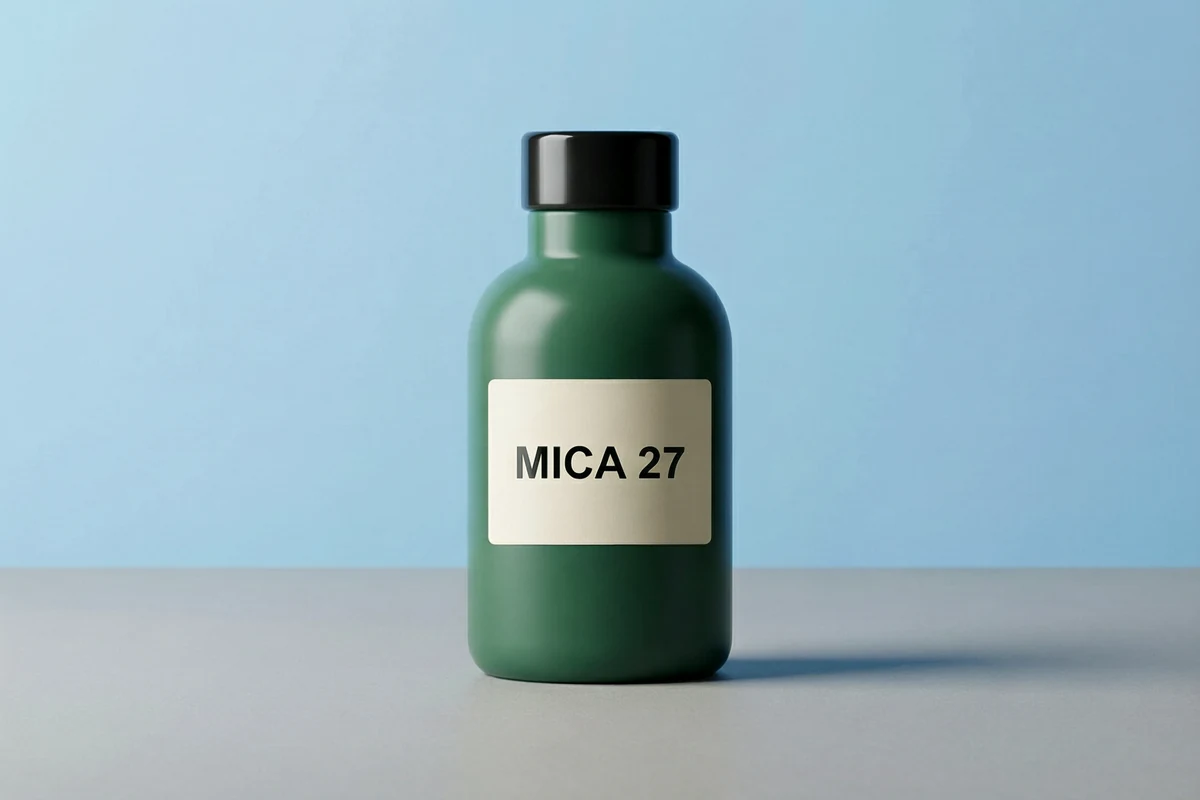
This is a compressed 1200 × 800 preview. Download the 2496 × 1664 output PNG to inspect the original-resolution image. Generation metadata was removed from that download; decoded image pixels were preserved. No text was repaired.
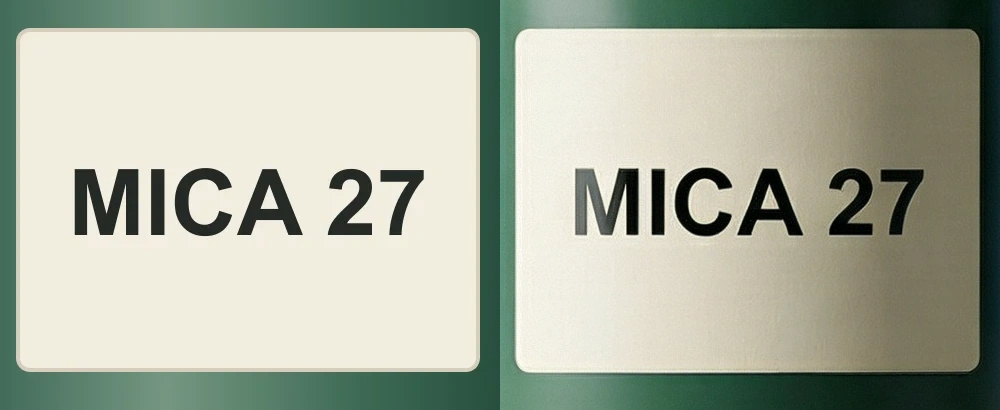
The left half comes from the actual WebP reference and the right half from the output. Each crop starts at x = 1000, y = 760 and covers 500 × 410 pixels in its 2496 × 1664 image. The two crops were placed side by side without resizing or text repair, then encoded as a 1000 × 410 WebP. Open the comparison at full size; a phone’s fitted preview is smaller than the native pixels.
| Check | Observation in this one output |
|---|---|
| Letters and digits | MICA 27 remains readable in the same order, with a visible gap before 27. No added or missing character is visible in this short label. |
| Letter appearance | The output’s strokes and edges differ from the reference; the left side of the M also picks up the new illumination. Readable wording is not identical typography. |
| Label | A cream rounded rectangle remains on the front, but its flat fill becomes textured and shaded, darker toward the right. |
| Bottle and cap | One complete green bottle and dark cap remain recognizable. The flat illustration gains strong highlights, rounded shading and darker edges. |
| Background and shadow | The wall becomes pale blue and the tabletop light gray. A stronger shadow extends to the right. |
The request said “replace only” the surroundings, yet visible changes extend into the bottle and label. If your deliverable requires the exact original product artwork, this result does not establish that requirement was met.
4. What does this say about product-label preservation?
This one large short label stayed readable; the product rendering changed. That is the supported result. There was no repeat series, comparison prompt, real product photograph, long ingredient list, barcode, multilingual label or small type in this test. It cannot establish a success rate or show that this particular wording caused the outcome.
Treat a correct word and a correct product as separate decisions. A label can spell the right name while changing its typeface, color, placement or printed appearance. Real listings also need accurate packaging, quantity, materials and other product details. Compare those with your authorized source material before deciding whether the image is suitable.
For another text check, the short poster-headline example examines a generated headline. It answers a different question from preserving lettering already printed on a product.
Need a second colorway for the same item? The bottle recolor test starts with this exact reference, asks for a teal bottle body, and compares the output with the requested hex code.
5. Check your own edit before keeping it
- Keep the original reference and write down the exact text, including spaces, punctuation and digits.
- Download the full output and compare every character. Check the label’s edges and position separately from spelling.
- Inspect the cap, shoulders, base, color and reflections. A nicer background can hide unwanted product changes at thumbnail size.
- If a detail fails, name that detail in a new request and compare again. A retry is another attempt with a new quote; this example does not prove that retrying fixes it.
Use the reference-file preparation guide if your image needs resizing before upload. Then open the image workspace, choose Edit Image, upload an image you have the right to use and review the current total before submitting. A completed image you dislike is different from an output the service marks as failed; check the task status and current service terms rather than assuming a refund.
6. Does the label stay readable as the shot tightens?
MICA 27 and the gap before 27 stayed readable in all five checked frames. The shot tightened visibly. The prompt asked to keep the full bottle in frame. The top edge cut into the cap at 3.833333 and 5.125 seconds, and the base was close to the lower edge in the last frame. These observations describe the framing in the sampled images.
We used the unretouched output PNG from section 3 as the only Start Frame in one isolated MiniMax H3 video run, with End Frame empty. We requested 720P / 4:3 / 5 seconds. The delivered video measured 1120 × 832, with 124 frames at 24 fps, and lasted about 5.167 seconds.
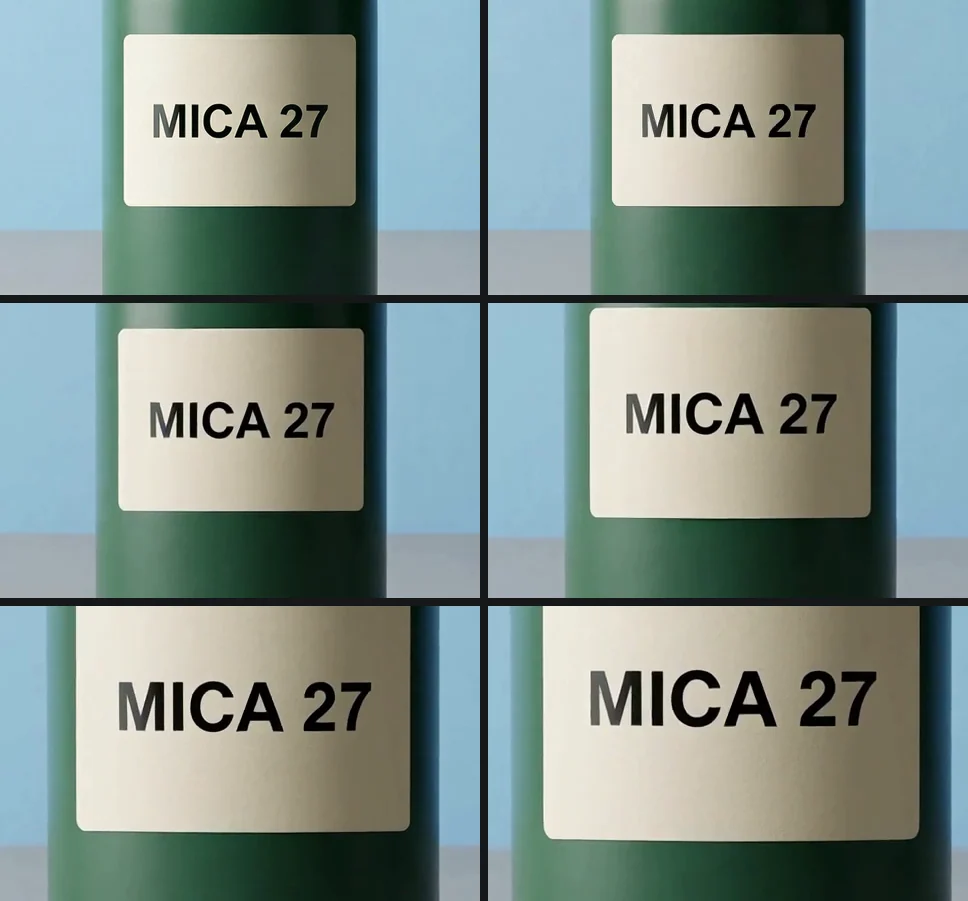
The compressed grid combines native-pixel label crops. The first panel is an approximation of the preprocessed still. The next five are decoded video samples in time order. Check the clip itself for full-frame composition.
This silent viewing copy keeps the original video packets and frame timing. The original file was retained for review.
The complete submitted video prompt follows.
One continuous five-second product shot from the supplied opening image. Slowly push straight in toward the same upright green bottle. Keep its cap and base inside the frame and the cream label facing the camera, unobscured. Preserve exactly the printed text MICA 27, with the visible gap before the two digits. Keep the pale blue wall and gray tabletop. No added text, props, rotation, cuts or speech.To try it, download the output PNG in section 3 and open Image to Video. Select MiniMax H3, upload the PNG as Start Frame, leave End Frame empty, then choose 720P / 4:3 / 5 seconds. Paste the prompt and check the current quote before submitting. On your own clip, check the spelling and the cap and base separately. If the full bottle needs to stay visible, leave more room around it or ask for a gentler push-in.
These findings cover five sampled frames of one clip. Continuous readability, repeatability, fine print, and real logos remain untested.
For a second shot, we exported this clip’s last decoded frame as a PNG and used it as the Start Frame of a separate MiniMax H3 image-to-video request. At the cut, the wall looked slightly darker and the label appeared slightly larger. The last-frame follow-up includes the exact PNG, a comparison across the cut, and the steps to start a new request.