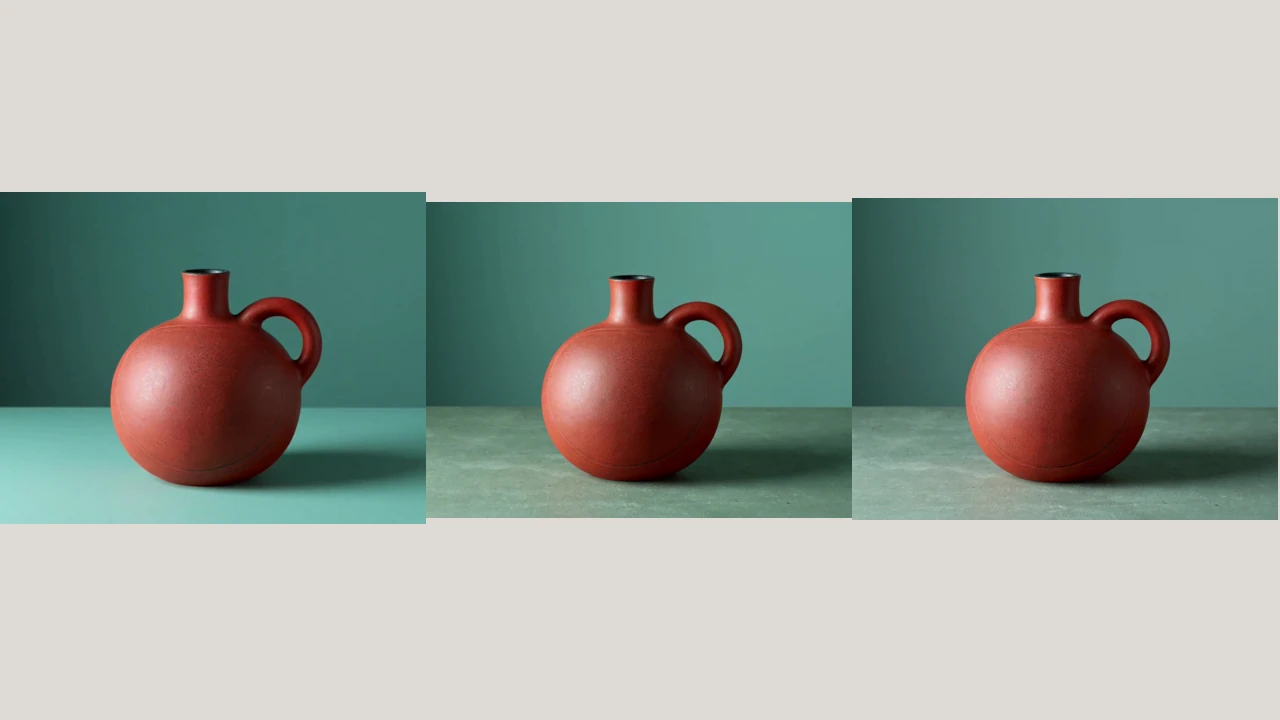
For a five-second MiniMax H3 Image to Video request at 16:9, the public workspace quotes rechecked on November 15, 2026 were 10 credits at 480P, 20 at 720P and 40 at 1080P. Yes, you can also use your own still image: choose Image to Video and manually upload it as the starting frame; check that mode’s quote before submitting. Before buying credits, decide whether you need a short draft, more room for a longer shot, or a higher-resolution delivery. Then check the quote for that exact configuration.
This guide separates quotes from generated results. The November 13, 2026 lake sample is a 480P, five-second, 16:9 text-to-video task. Section 6 adds a different comparison: the same ceramic-jug start image at three resolution settings, requesting five seconds and 4:3. It reuses a November 14 isolated 480P run and adds one 720P and one 1080P run on November 15. These samples help you inspect concrete files; they do not establish a quality ranking or success rate. To try the same setup, jump to the start-frame instructions.
minimaxh3.info is an independent service. Its workspace settings describe this hosted implementation, not every capability of MiniMax’s official model or API.
1. Compare credits and available durations together
The five-second prices and available durations were checked in the public workspace on November 13, 2026. Longer-duration credit figures below are budget calculations from the workspace’s default pricing matrix; confirm their live quote before buying. A dash means that H3 combination is not offered here; it does not mean a free generation.
| H3 resolution setting | 5 seconds | 10 seconds | 15 seconds | 20 seconds | Longest available clip |
|---|---|---|---|---|---|
| 480P | 10 credits | 20 credits | 30 credits | 40 credits | 20 seconds |
| 720P | 20 credits | 40 credits | 60 credits | — | 15 seconds |
| 1080P | 40 credits | 80 credits | — | — | 10 seconds |
For the same five-second request, 720P uses twice the credits of 480P; 1080P uses four times as many. A longer request also changes the cost. Forty credits can cover one 480P/20-second request, one 720P/10-second request, or one 1080P/5-second request at these listed rates. Those choices solve different tasks; they are not equivalent outputs.
The duration menu changes with resolution. Do not buy credits expecting a 20-second 1080P H3 option: this workspace does not offer it. Changing models also changes the available settings, so confirm that the model selector still says MiniMax H3.
Credits are a usage unit, not a universal dollar price. Packs and subscriptions have different credit amounts and validity rules. Compare the current credit plans with the exact quote in the video workspace. If the quote changes, review it before submitting; these dated figures do not lock a future price.
2. Choose a starting point for your task
| What you need to decide | A reasonable first configuration | Credit trade-off at the listed rates | What still needs checking |
|---|---|---|---|
| Is the scene, camera instruction or motion idea worth pursuing? | 480P, 5 seconds | 10 credits for one short attempt | Watch the whole result; a usable still does not establish good motion |
| Does a shot need more time to develop? | Compare 480P/10 seconds with 720P/5 seconds | Both list 20 credits, but one buys more duration and the other a higher resolution setting | Decide whether the action actually needs ten seconds before requesting it |
| Is a short clip intended for a larger display or a crop in an edit? | Consider 720P/5 seconds or 1080P/5 seconds once the concept is clear | 20 versus 40 credits | Inspect actual pixel dimensions and fine details; a higher setting does not guarantee a better subject or more coherent motion |
| Do you need a particular opening composition? | Use Image to Video with a starting frame | Check that mode’s complete quote before submitting | The starting frame guides the opening; inspect object consistency throughout the video |
If your next decision is still about the prompt, spending 40 credits on one 1080P attempt may leave less room for iteration than several short 480P attempts. That is budget arithmetic, not a promise that three or four drafts will solve a difficult scene. Every newly submitted generation needs its own quote.
Resolution also cannot repair an unclear instruction. Specify the subject, one intended action and a camera move you can evaluate. Change one important instruction at a time so you can tell what the next result changed.
3. What one completed 480P download contained
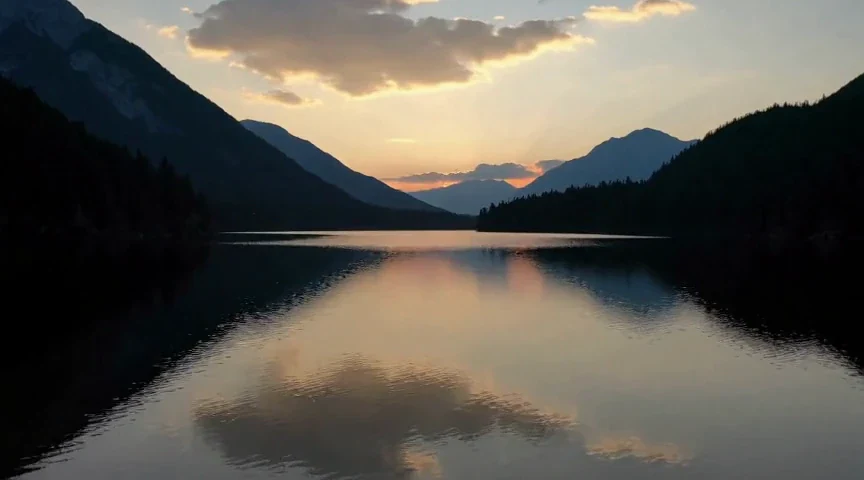
Actual frame from the November 13 production test. The published WebP is a compressed preview of an extracted PNG. A single frame cannot demonstrate motion quality, audio quality or consistency across the clip.
View or download the actual five-second MP4 (about 1.77 MB). This is the original downloaded file from this one test, not a re-encoded demonstration or an image-to-video example.
The test requested MiniMax H3 / Text to Video / 480P / 5 seconds / 16:9. It completed through the website’s submission, status and download flow. The quote and reconciled task charge were 10 credits.
| Download property | Observed in this one file |
|---|---|
| Container | MP4 |
| Video codec | H.264 |
| Audio stream | AAC track present |
| Pixel dimensions | 864 × 480 |
| Frame rate | 24 fps |
| Reported file duration | 5.167 seconds for the five-second request |
| File size | 1,772,159 bytes, about 1.77 MB |
The requested duration and the container’s reported duration need not be identical to three decimal places. The recorded file is not evidence that all future five-second files have that same duration or size. An AAC track establishes that an audio stream exists; it does not establish speech intelligibility or useful sound for your edit. For a spoken example, play a portrait clip and compare its original audio with the requested six-word line.
The scene prompt was:
A quiet mountain lake at sunrise, soft golden light on the water, gentle ripples and slowly moving clouds. One smooth slow camera movement. Natural scenery only, no people, no text.For a small preview or an editing test, this file lets you inspect a concrete 864 × 480, 24 fps delivery. Whether it is suitable for your final destination depends on the display size, crop, subject detail and the destination’s upload requirements. We have not tested this sample’s appearance after every platform’s recompression.
The 480P label is a workspace profile, not a promise of 854 × 480 for every aspect ratio. This implementation calculates the canvas from a pixel-area setting and the chosen aspect ratio, aligning dimensions to multiples of 32. For that 16:9 request, the downloaded file measured 864 × 480 pixels. Check the downloaded file rather than assuming standard television dimensions from the label. There is no frame-rate selector in the current H3 workspace; this lake file alone establishes 24 fps only for itself. Section 6 separately measures three image-to-video outputs.
4. Can I turn a MiniMax H3 Image result into a video using my own first frame?
Choose Text to Video when a written scene is the starting point, as it was for the lake test. Choose Image to Video when you already have a still whose opening composition matters.
To use a still:
- Prepare the image in the H3 Image workspace, or use an existing image.
- Download the PNG you want to animate. The background-editing walkthrough shows how to compare an edit with its original before choosing a result.
- Open Image to Video. Upload the PNG as Start Frame. The optional End Frame is a separate input.
- Describe the intended movement, select resolution, aspect ratio and duration, and check the current credit quote. Submit only when those settings match your task.
This transfer is manual download and upload. Opening either workspace does not generate a video, carry an image across automatically or include the image task’s cost in the video quote. This article’s lake result used no starting or ending image. Section 6 contains separate isolated image-to-video samples, not production browser upload or billing tests.
5. How many credits for one H3 Image still plus a five-second video?
At the November 15, 2026, 00:17 Beijing-time public quotes, a 480P five-second image-to-video request budgets 10 credits with an existing still, 13 credits after generating one new still, or 14 credits after editing an image you already have. These paths start from different materials; choose the row that matches yours.
We checked the English and Chinese workspaces anonymously. Text to Image / 1:1 / one output displayed 3 credits, and Edit Image / Match original / one output displayed 4 credits. No source image was uploaded in this quote check, so it establishes no delivered edit dimensions. In the video workspace, selecting MiniMax H3 / Image to Video / 16:9 / 5 seconds displayed 10, 20 and 40 credits at 480P, 720P and 1080P, respectively.
For 16:9 / 5 seconds, add the video quote to the image step: 0 credits to reuse your own still, 3 to generate one new still, or 4 to edit an original image you already have. The table shows the total credits, including one video request.
| Video | Own still | Generate | Edit |
|---|---|---|---|
| 480P | 10 | 13 | 14 |
| 720P | 20 | 23 | 24 |
| 1080P | 40 | 43 | 44 |
These totals are arithmetic budgets from separate displayed quotes, not a combined checkout price or a recorded payment. The public check involved no login, upload, generation or payment. Zero additional image credits means reusing an existing file; it does not mean a free new image generation. If you start from scratch, generate a still and then edit it before making the video, add both image steps: 3 + 4 + video = 17 / 27 / 47 credits for the three five-second video profiles.
For a concrete plan, start with the existing PNG of the red-orange jug on a gray background, request one image edit to turn the background and tabletop teal, inspect it, and upload the chosen PNG as Start Frame. At the checked 480P / 16:9 / 5-second quote, that plan is 4 + 10 = 14 credits. It excludes a new text-to-image task because you already have the gray source. The published first-frame versus first-and-last-frame comparison provides downloadable jug inputs and actual clips to inspect. Those samples used a 4:3 preset in an isolated run; they are not proof that this 16:9 budget was submitted or charged.
Use the image and video workspace links in section 4 to prepare each task, then compare the current totals with the credit plans. Check the selected mode and output count before each submission: three uploaded references are not three generated images. A second image attempt or video retry adds another separately quoted request. Inspect the still before buying a video attempt, and recheck any changed resolution, duration or aspect ratio rather than assuming the table fixes its price.
One credit pack or two monthly billing cycles?
Start with zero credits and an image you already have. One set of requests costs 24 credits at the November 15, 2026 quotes on minimaxh3.info. A single MiniMax H3 Image edit uses 4 credits, and turning its output into one five-second, 16:9 video at 720P uses 20.
Ten sets in each of two billing cycles. You need 240 credits in the first cycle and 240 in the next, for a total of 480. The USD 9.90 one-time Starter Pack supplies 500 credits for 365 days. If both batches are charged within that period at the quoted rates, 20 credits remain. Keeping Basic Monthly active for both cycles means two USD 9.90 charges, or USD 19.80. Each payment grants 600 credits for its own billing cycle. Unused subscription credits expire at the end of that cycle.
Twenty-four sets in a single billing cycle. Now you need 24 × 24 = 576 credits before the next renewal. One Starter Pack falls short by 76. One USD 9.90 Basic Monthly payment covers the requests with 24 credits left for that cycle. Basic renews automatically until cancelled.
Use your own balance and intended submission dates when you compare the current plans. These examples use USD list prices before tax and assume one charged edit and one charged video per set. Trial credits, discounts and retries can change the budget. Check the total shown at checkout and the current terms for expiry, cancellation and refunds.
6. What did the same start image produce at all three settings?
These clips use Image to Video / one start frame / no end frame / 5 seconds / the 4:3 preset, with seed 2026111401 and the same prompt. There is one sample per resolution. The 480P clip is the existing November 14 first-frame-only run from the start-and-end-frame comparison; only 720P and 1080P were newly generated on November 15.
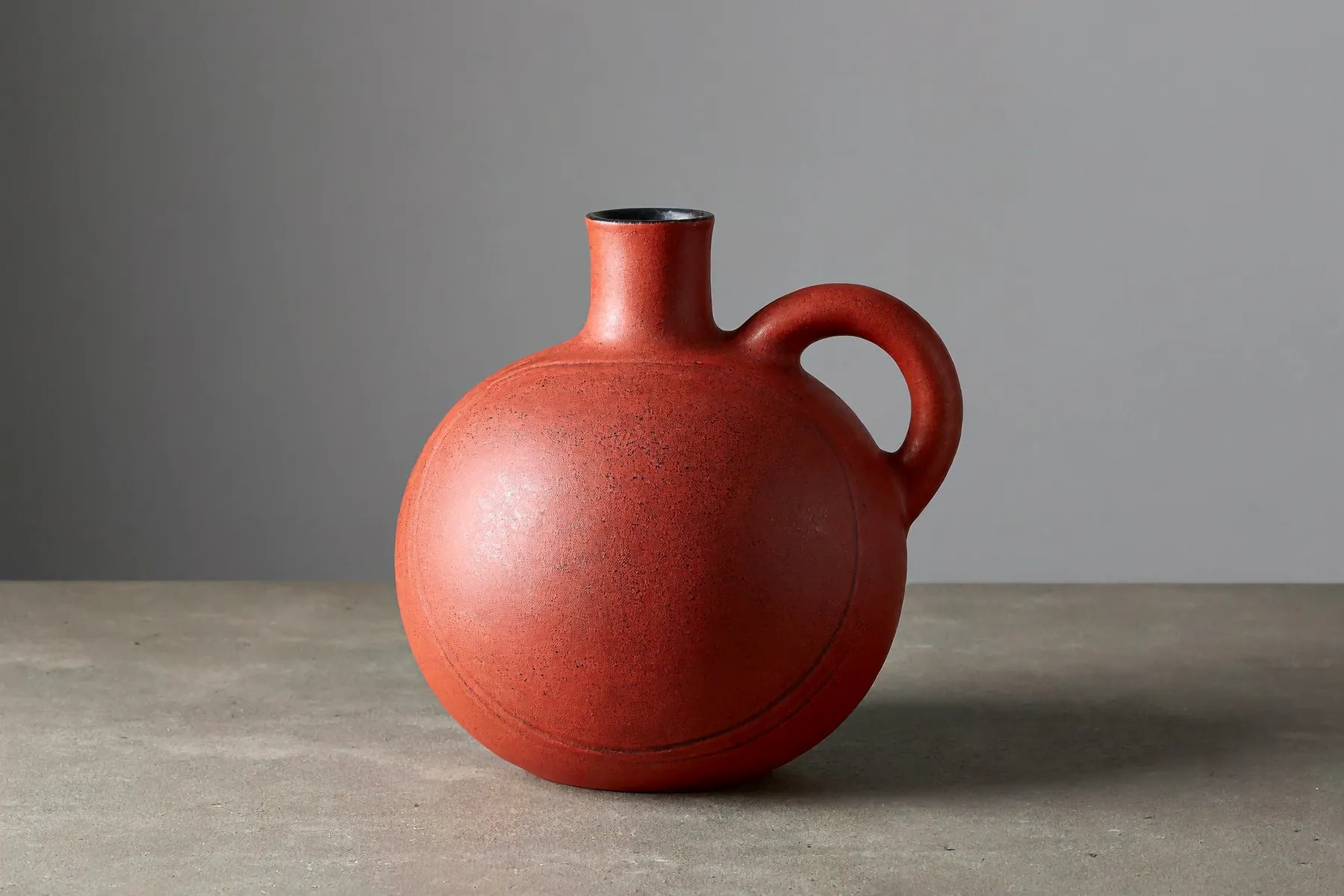
All three used the same 2496 × 1664 gray-jug PNG, an existing AI-generated still. It is a 3:2 source, not 4:3. The workflow center-crops it to fit the output canvas; writing “no cropping” cannot cancel that preprocessing. Aligned canvas dimensions also differ slightly in ratio between profiles.
Complete prompt used for all three clips:
A locked-off static camera shows the same red-orange ceramic jug in the same position, scale and orientation throughout one continuous five-second shot. Preserve the jug silhouette, handle, mouth, glaze texture and soft lighting. The neutral gray wall and tabletop gradually change to a muted teal-green background and tabletop. End on the teal-green setting. No camera movement, no zoom, no reframing, no cropping, no cuts, no added objects, no text.The new runs used the archived 480P workflow with only its pixel-area setting changed. The container image and startup command matched the older run, but baseline model-weight and mounted-node file hashes were unavailable. Container equality does not prove every file stayed unchanged across dates; this is not an immutable-build benchmark or a guarantee of exact reproduction. These isolated workflow runs did not measure production credit debits or website waiting time.
Actual deliveries and the separate 4:3 quote
| Requested profile | Actual pixel dimensions | Public native MP4 size | November 15 public 4:3 / 5-second quote |
|---|---|---|---|
| 480P | 736 × 576 | 705,253 bytes | 10 credits |
| 720P | 1120 × 832 | 1,637,526 bytes | 20 credits |
| 1080P | 1440 × 1088 | 2,838,598 bytes | 40 credits |
All three public native files fully decoded and contain H.264 video, 124 frames at 24 fps, about 5.167 seconds of container duration and an AAC stereo audio stream. The last frame starts at 5.125 seconds, before the file ends. These sizes describe the specific downloads, not typical sizes for future clips. Audio-stream presence does not establish useful sound or intelligible speech.
The 4:3 quotes were checked separately in anonymous English and Chinese public workspaces, selecting MiniMax H3, Image to Video and five seconds on November 15. They match the earlier 16:9 budget table’s numbers, but are a different configuration check. Neither the quote check nor the isolated runs establishes a production charge for this comparison. Confirm your exact settings and live total before submitting.
Compare matching time points
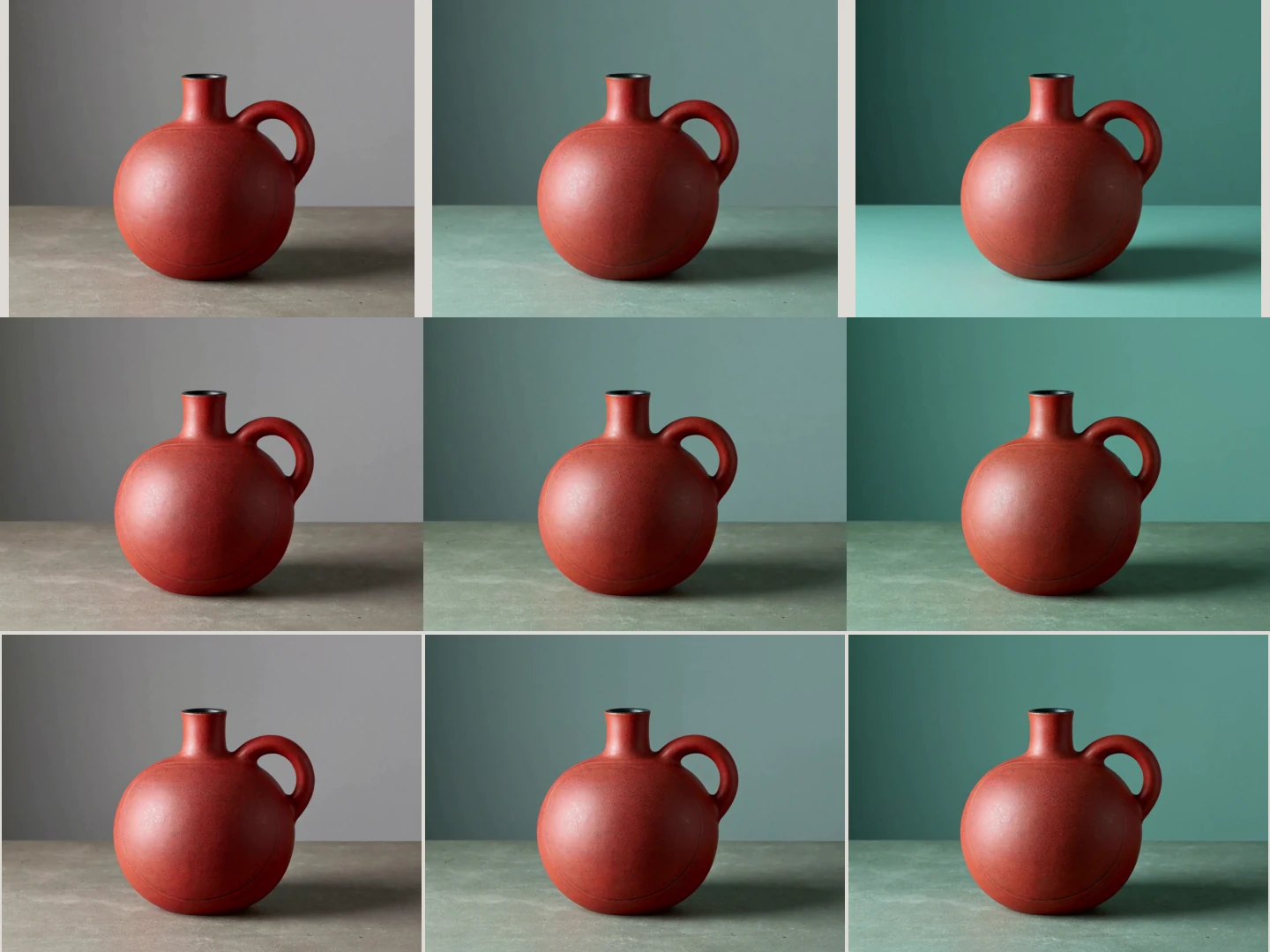
Rows are 480P / 720P / 1080P; columns are decoded frames 0 / 62 / 123, at 0.000 / 2.583 / 5.125 seconds. Complete frames were resized and padded into equal display panels, without cropping. This compressed WebP compares composition and time points, not native-pixel sharpness. The cover contains the three final frames left to right in the same profile order, fitted with padding.
In the sampled frames, the whole jug, open neck and right-side handle remain visible in all three rows, and the gray setting turns teal-green. At the middle sample, the walls have changed color while the tabletops remain relatively gray. At the final sample, the 480P tabletop is brighter, more cyan and uniform; the 720P and 1080P tabletops show more mottled texture and a grayer green. Wall tone, light and shadow also differ. These observations do not establish that resolution alone caused the differences or that a higher profile is always preferable.
Three frames cannot establish full-clip motion quality, absence of a brief artifact or product fidelity. Watch the complete files before choosing.
Play previews or inspect the native files
The players use separately re-encoded 640-pixel-wide compressed previews, which do not preserve native detail. They start only when you choose playback. Native downloads were cleaned by metadata-removing stream copy: the original compressed audio/video packet data was retained without video re-encoding. Cleanup is not a picture repair.
480P preview
Open the native 480P MP4, 736 × 576.
720P preview
Open the native 720P MP4, 1120 × 832.
1080P preview
Open the native 1080P MP4, 1440 × 1088.
Try the comparison with the same start frame
Load the gray PNG as the start frame. The workspace uses the original 4.9 MB PNG for the Start Frame preview. Confirm MiniMax H3 is selected, leave End Frame empty, and choose 4:3, 5 seconds, and your resolution. Paste the prompt above, check the current credit total, and submit when ready.

To upload manually, open Image to Video, select MiniMax H3, and add the gray PNG linked above under Start Frame. Each profile is a separate request. The higher settings delivered larger canvases in these samples; whether that is worth more credits depends on your viewing size, crop and inspection of the actual clip.
Before buying or submitting
Start with the decision you need the clip to answer. Check the model, mode, aspect ratio, duration and current total; then compare the required credits with the plan you are considering. After completion, inspect the whole video and its file properties before choosing it for an edit.
Open the MiniMax H3 video workspace to compare settings, or review the current credit plans. The cover contains actual final frames from the three jug clips; the lake frame remains a separate November 13 text-to-video result.